
Introduction
The best way to use Visual Paradigm’s ecosystem is not to make every teammate use every tool. It’s to give each role a clear job, then connect their outputs through a workflow the team understands.
A modeler may do most of their work in Visual Paradigm Desktop. A business analyst might begin with an online canvas. A product lead may use an AI tool to explore a first draft. A technical writer can bring an approved diagram into OpenDocs and explain it for readers. The Unified Platform helps everyone find the apps and artifacts they need.
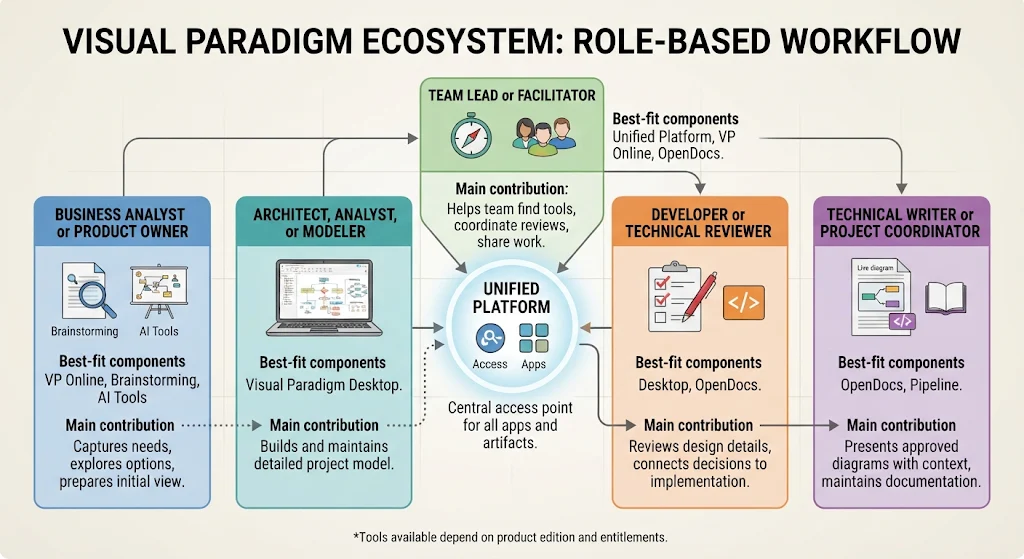
This role-based approach can reduce friction between brainstorming, modeling, review, and documentation—while keeping ownership of each artifact clear.
Who uses what?
| Role | Best-fit components | Main contribution |
|---|---|---|
| Business analyst or product owner | VP Online, brainstorming or canvas apps, AI tools | Captures needs, explores options, and prepares an initial view of the problem |
| Architect, analyst, or modeler | Visual Paradigm Desktop | Builds and maintains the detailed project model |
| Developer or technical reviewer | Desktop, OpenDocs | Reviews design details and connects decisions to implementation |
| Technical writer or project coordinator | OpenDocs, Pipeline | Presents approved diagrams with context and maintains project documentation |
| Team lead or facilitator | Unified Platform, VP Online, OpenDocs | Helps the team find tools, coordinate reviews, and share work |
The exact tools available can depend on the team’s product edition, account, and entitlements. Confirm access before making a particular app or integration a required part of the process.
A workflow shaped around team roles
1. The product owner or analyst frames the problem
Start with the need, not the diagram. The analyst or product owner collects requirements, business rules, and unresolved questions. For workshops or early exploration, they can use a browser-based canvas or diagramming app; an AI tool can also help create a first draft from a description.
Benefit: Stakeholders can contribute before the team commits to a detailed technical model.
Tip: Keep the original requirement or prompt with the project notes. A draft diagram is more useful when reviewers can see what it was meant to answer.
2. The modeler turns the draft into a maintainable design
The architect or modeler reviews the proposal and develops the authoritative model in Visual Paradigm Desktop when the work calls for detailed modeling and ongoing project maintenance. They check the diagram against requirements, correct terminology and relationships, and identify assumptions that need confirmation.
AI-generated content should be treated as a starting point rather than an approved design. Human review is especially important when a diagram will guide implementation or communicate a formal decision. The Unified Platform also describes a workflow in which AI-generated diagrams can be imported into Desktop for refinement.
Benefit: The team can use quick ideation without mistaking an early draft for a complete model.
Tip: Name the maintained Desktop project or other source of truth explicitly. Don’t let an exported image quietly become a competing “official” version.
3. The reviewer checks meaning, not just appearance
A developer, domain expert, or designated reviewer checks whether the model reflects the real process or system. They can focus on whether the scope is clear, important cases are represented, and terminology matches the team’s shared language.
Benefit: Review catches misunderstandings before diagrams are used in planning, documentation, or implementation.
Tip: Ask reviewers to identify what is incorrect, missing, or ambiguous—not merely whether the diagram “looks good.”
4. The documentation owner publishes the model with context
Once the diagram is approved, the modeler can send a supported artifact from Desktop to the OpenDocs Pipeline. The documentation owner then places it on the relevant OpenDocs page and adds the explanation readers need: purpose, scope, assumptions, decisions, and related links. Visual Paradigm describes the Unified Platform as providing access to OpenDocs and a pipeline for sending Desktop diagrams into documentation.
Benefit: Readers can understand the diagram without needing to locate the modeler or infer its purpose.
Tip: Put explanatory text near the diagram. Include its owner and status so readers know whether it is a draft, reviewed model, or approved reference.
5. The team lead coordinates access and review
The team lead can use the Unified Platform as the shared entry point for launching available apps and locating artifacts. In Desktop, the platform can be accessed through Team / Unified Platform > Unified Platform.
The lead should also make review responsibilities clear: who owns the source model, who updates documentation, and who approves changes that affect other teams.
Benefit: People spend less time figuring out where to start and who is responsible for the next step.
Tip: Keep the process lightweight. Assign only the ownership and approvals needed to prevent confusion; avoid creating a separate approval layer for every small edit.
How the handoffs fit together
A role-based workflow might look like this:
Analyst frames the need → team drafts in VP Online or with AI → modeler refines in Desktop → reviewer checks the design → modeler sends the artifact through Pipeline → documentation owner explains it in OpenDocs → team shares it through the agreed workspace
Not every project needs every step. A quick workshop may stop after an online canvas, while a complex system design may require Desktop modeling, formal review, and maintained documentation. The Unified Platform helps people access the ecosystem, but the team still needs to decide how artifacts move and which version is authoritative.
Benefits of organizing by role
-
Less tool overload: Each person uses the components that fit their work instead of learning the entire suite at once.
-
Clearer ownership: The team knows who maintains the source model and who publishes its documentation.
-
Faster starts: Analysts can explore ideas in a lightweight setting before asking modelers to formalize them.
-
More useful documentation: OpenDocs can pair a diagram with the explanation and decisions that make it understandable.
-
More deliberate collaboration: Reviews happen at defined handoffs rather than relying on informal assumptions.
-
Better continuity: A shared workspace makes it easier for people to locate relevant apps and artifacts.
Tips and tricks for a smoother workflow
-
Choose the tool by the job. Use VP Online for browser-based creation or collaboration, Desktop for detailed modeling, and OpenDocs for explanatory documentation.
-
Distinguish drafts from approved models. Use clear names or status labels so an AI draft is not mistaken for a reviewed design.
-
Put a short purpose in Pipeline comments. A useful comment tells the documentation owner what the artifact is and why it is being sent.
-
Agree on the source of truth. Identify where the maintained version lives and link to it from supporting materials.
-
Review updates after publishing. When the source model changes, follow the team’s Pipeline and OpenDocs update process; don’t assume every embedded copy has updated automatically.
-
Pilot on one project. Test the roles, handoffs, and access requirements before rolling the process out across the organization.
-
Check licenses and access early. Available online apps and integrations may depend on edition or account entitlements.
Conclusion
A productive Visual Paradigm workflow starts with the team’s roles and the work each person needs to accomplish. Analysts can frame the problem and explore ideas, modelers can maintain the detailed design in Desktop, reviewers can validate it, and documentation owners can present approved diagrams in OpenDocs. The Unified Platform gives the team a shared place to discover and access ecosystem tools.
The most important practice is to make ownership and handoffs explicit. Use AI and online tools to help people get started, Desktop to maintain models that need depth, Pipeline to transfer supported artifacts, and OpenDocs to give those artifacts context. That way, the ecosystem supports the team’s process instead of forcing everyone into the same tool or assuming every change synchronizes on its own.