

Visual Paradigm C4 Model Support and AI-Assisted Features: A Comprehensive Guide

Read this post in:

1. Why C4 and Why Visual Paradigm?

The Problem C4 Solves

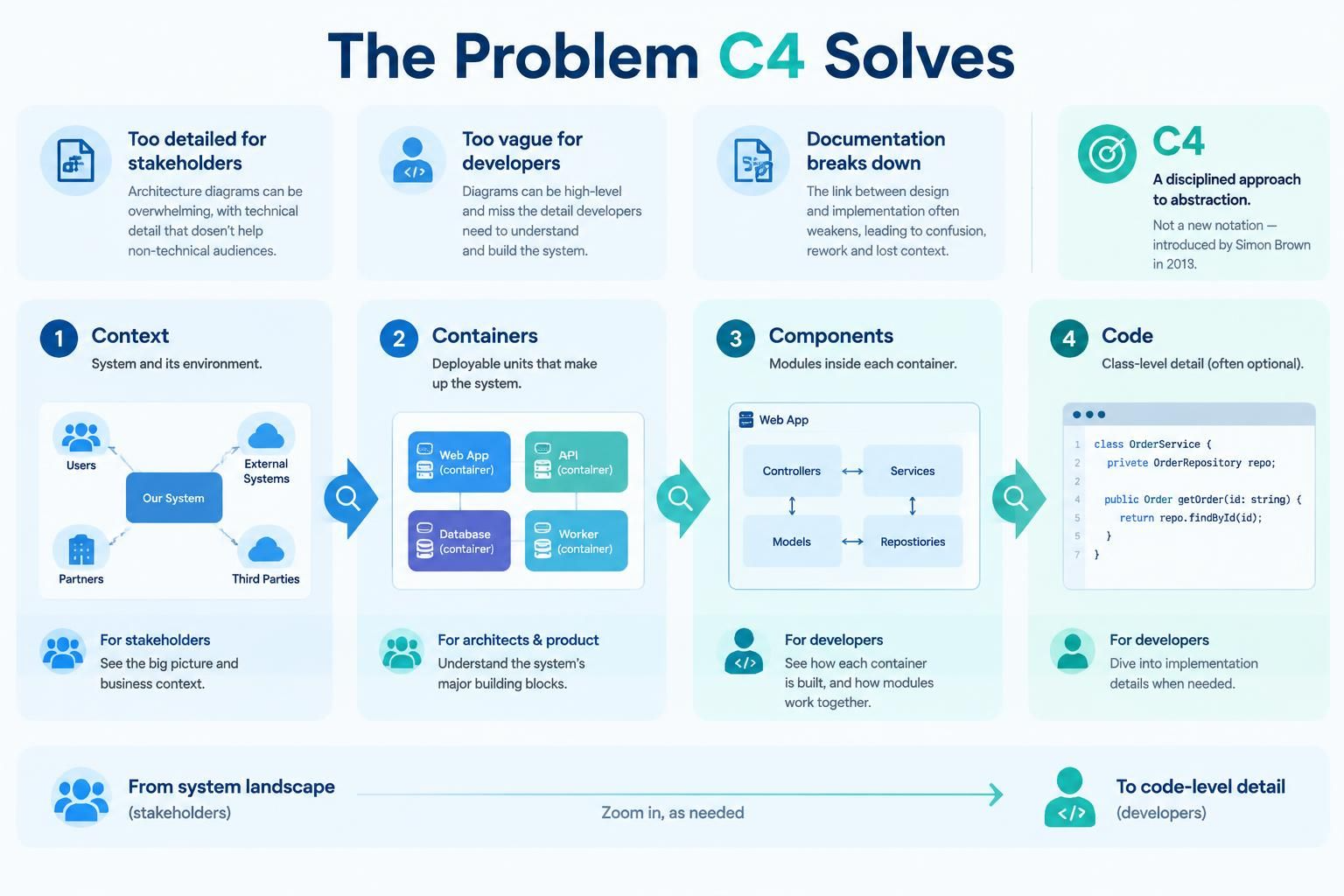
Software architecture documentation often fails at its primary job: communication. Teams produce diagrams that are either too detailed for stakeholders or too vague for developers, and the documentation rarely survives the handover from design to implementation. Simon Brown introduced the C4 model in 2013 as a direct response to this failure—not as a new notation, but as a disciplined approach to abstraction .

Visual Paradigm C4 Model Support and AI-Assisted Features: A Comprehensive Guide

C4 organizes architecture visualization into four hierarchical levels: Context (how the system fits into its environment), Containers (the deployable units that make up the system), Components (the modules inside each container), and Code (class-level detail, often optional). Each level serves a distinct audience and purpose, preventing the cognitive overload that comes from mixing abstraction levels .

Why Visual Paradigm for C4

Visual Paradigm has integrated C4 modeling deeply into its ecosystem, offering three complementary pathways:

Pathway Best For Key Strength
C4-PlantUML Studio AI-driven diagram generation from natural language Converts descriptions to PlantUML code and visual diagrams in under 10 minutes
VPasCode Developer-native editing with text-based formats Native AI generation for PlantUML, Mermaid, Graphviz, and DBML with side-by-side code diffs
Visual Paradigm Online/Desktop Template-based modeling and team collaboration Pre-built C4 templates, real-time collaboration, export to PDF/PNG/SVG

The standout capability is the AI-assisted generation that bridges natural language requirements and standardized C4 notation. Rather than manually drawing boxes and arrows, architects can describe the system and receive editable, syntactically correct diagrams that follow C4 conventions .


2. Who Benefits from This Tooling?

Role Primary Use Case Value Delivered
Software Architects Rapid prototyping of system designs; communicating architecture to non-technical stakeholders Generate Context and Container diagrams from a paragraph description; iterate without manual redrawing
Developers Onboarding, debugging, and keeping diagrams synchronized with code changes Export as PlantUML/Mermaid for version control; refine diagrams conversationally with AI
Technical Leads / Engineering Managers Sprint planning and cross-team alignment Quickly sketch C4 Context diagrams in meetings to clarify system boundaries and integration risks
DevOps / Platform Engineers Deployment and infrastructure visualization C4 Deployment diagrams complement Container views; export to documentation pipelines
Technical Writers / Documentation Specialists Living architecture documentation Generate and update diagrams from text specifications; embed in Confluence, GitHub, or Notion

3. Standout Features

AI-Powered Diagram Generation from Natural Language

The AI Diagram feature (accessible via Tools > AI Diagram in Visual Paradigm) analyzes natural language input and produces a fully editable native diagram file—not a static image . For C4 specifically, the C4-PlantUML Studio accepts a system description (e.g., “Users browse products, admins manage inventory, payments go through Stripe”) and generates a complete set of C4 diagrams: Context, Container, and optionally Component views .

Critical distinction: The output is not just a picture. It is PlantUML code that can be version-controlled, diffed, and refined. The AI reduces syntax errors and applies C4 conventions automatically .

Dual Editing Modes: Visual and Text

Visual Paradigm supports both drag-and-drop visual editing and direct PlantUML/Mermaid code editing. Changes made in one mode propagate to the other. This matters because different team members work differently: architects may prefer visual manipulation, while developers want to paste code into their IDE or documentation pipeline .

Smart Connector with AI Suggestions

When building Container diagrams manually, Visual Paradigm’s Smart Connector can suggest relationships between containers based on their types and responsibilities. This reduces the tedium of drawing every arrow and helps catch missing dependencies .

Multi-Format Export for Developer Workflows

C4 diagrams can be exported as:

  • PlantUML/Mermaid/Graphviz/DBML — embed in GitHub READMEs, Notion docs, or CI pipelines

  • PNG, SVG, PDF — for presentations and formal documentation

  • Interactive HTML — for sharing with stakeholders who lack Visual Paradigm licenses

Conversation-Refined Diagrams (VPasCode)

In VPasCode, you can ask the AI to modify an existing diagram in natural language (e.g., “Add a Redis cache between the API gateway and the payment service”) and see a side-by-side code diff before accepting changes. The AI can also fix syntax errors automatically .


4. Example C4 Diagram with PlantUML Code

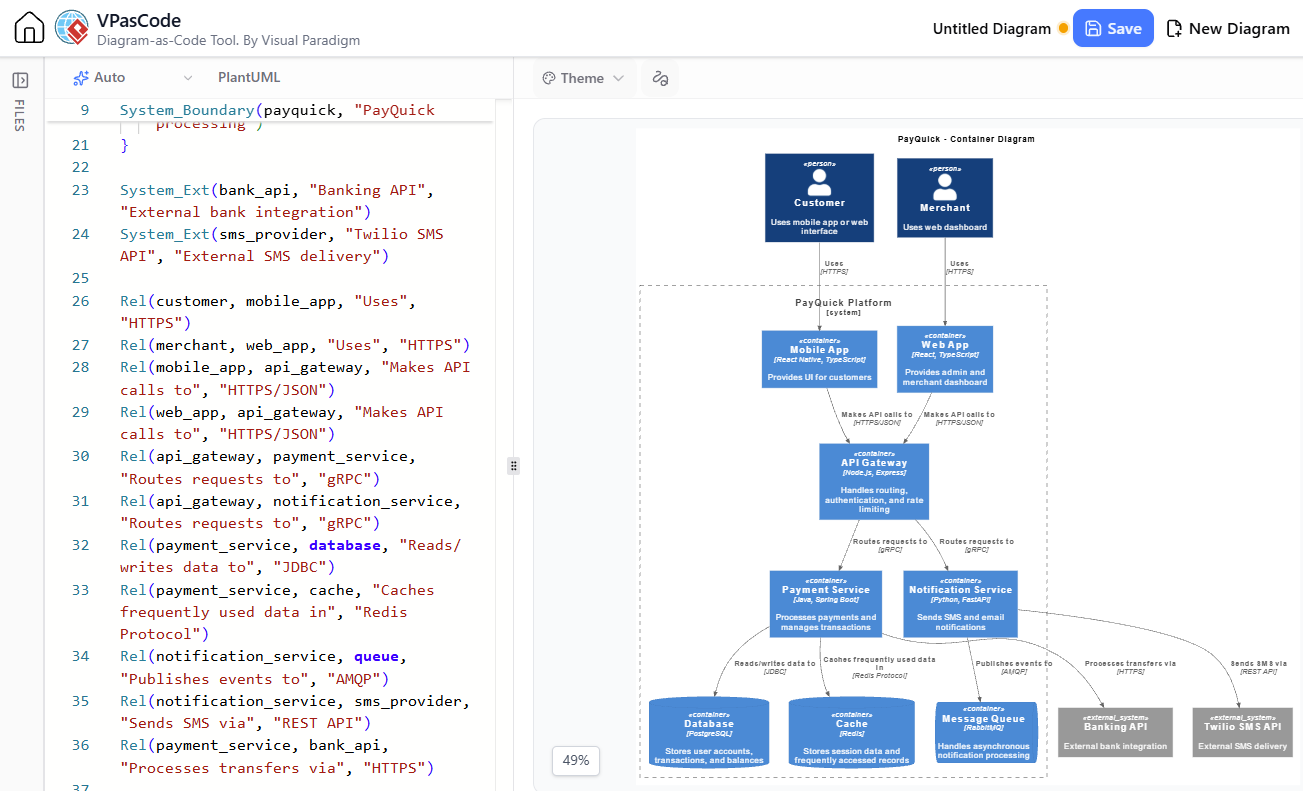
Below is a C4 Container diagram for a fictional payment platform (“PayQuick”), demonstrating the standard C4-PlantUML notation and relationship types.

plantuml


@startuml
!include https://raw.githubusercontent.com/plantuml-stdlib/C4-PlantUML/master/C4_Container.puml

title PayQuick - Container Diagram

Person(customer, "Customer", "Uses mobile app or web interface")
Person(merchant, "Merchant", "Uses web dashboard")

System_Boundary(payquick, "PayQuick Platform") {
    Container(mobile_app, "Mobile App", "React Native, TypeScript", "Provides UI for customers")
    Container(web_app, "Web App", "React, TypeScript", "Provides admin and merchant dashboard")
    
    Container(api_gateway, "API Gateway", "Node.js, Express", "Handles routing, authentication, and rate limiting")
    
    Container(payment_service, "Payment Service", "Java, Spring Boot", "Processes payments and manages transactions")
    Container(notification_service, "Notification Service", "Python, FastAPI", "Sends SMS and email notifications")
    
    ContainerDb(database, "Database", "PostgreSQL", "Stores user accounts, transactions, and balances")
    ContainerDb(cache, "Cache", "Redis", "Stores session data and frequently accessed records")
    ContainerQueue(queue, "Message Queue", "RabbitMQ", "Handles asynchronous notification processing")
}

System_Ext(bank_api, "Banking API", "External bank integration")
System_Ext(sms_provider, "Twilio SMS API", "External SMS delivery")

Rel(customer, mobile_app, "Uses", "HTTPS")
Rel(merchant, web_app, "Uses", "HTTPS")
Rel(mobile_app, api_gateway, "Makes API calls to", "HTTPS/JSON")
Rel(web_app, api_gateway, "Makes API calls to", "HTTPS/JSON")
Rel(api_gateway, payment_service, "Routes requests to", "gRPC")
Rel(api_gateway, notification_service, "Routes requests to", "gRPC")
Rel(payment_service, database, "Reads/writes data to", "JDBC")
Rel(payment_service, cache, "Caches frequently used data in", "Redis Protocol")
Rel(notification_service, queue, "Publishes events to", "AMQP")
Rel(notification_service, sms_provider, "Sends SMS via", "REST API")
Rel(payment_service, bank_api, "Processes transfers via", "HTTPS")

@enduml

This example follows C4 conventions: every element has a type, technology, and responsibility description; relationships specify intent and protocol. The !include directive pulls in the standard C4-PlantUML macros, ensuring consistent styling .

To generate this in Visual Paradigm:

  1. Go to Tools > AI Diagram (or open VPasCode).

  2. Select C4 Container Diagram as the target type.

  3. Paste a description like: “A payment platform with a mobile app and web dashboard, an API gateway, a payment service, a notification service, PostgreSQL, Redis, RabbitMQ, external bank API, and Twilio SMS. Customers use the mobile app, merchants use the web dashboard.”

  4. The AI generates the PlantUML code and visual diagram. Refine as needed .


5. Tips and Tricks

Tip 1: Respect the Abstraction Hierarchy

The most common C4 mistake is mixing levels—showing a database table in a Context diagram or listing class methods in a Container diagram. Before finalizing any diagram, ask: “Does every element on this diagram belong to the same level of abstraction?” If not, remove or promote the outlier .

Practical check: A Context diagram should be explainable in one sentence (“This shows how PayQuick interacts with customers, merchants, banks, and SMS providers”). If your explanation requires technical jargon, you’ve dropped a level too low .

Tip 2: Limit Elements Per Diagram

More than 10–12 total elements (people, systems, containers, components) makes a diagram difficult to parse. If you exceed this, split the diagram or group related elements under a single label (e.g., “Payment Services” instead of five individual microservices). The goal is communication, not completeness .

Tip 3: Use the AI as a Starting Point, Not the Finish Line

Visual Paradigm’s AI-generated diagrams typically cover about 80% of the structural work. The remaining 20%—refining relationship descriptions, adding technology choices, adjusting boundaries—is where human judgment matters most. Treat the AI output as a first draft that accelerates the tedious parts .

Tip 4: Leverage VPasCode for Code-Review Workflows

If your team uses pull requests for documentation changes, use VPasCode’s side-by-side code diff feature. When the AI modifies a PlantUML diagram, you can review exactly what changed in the code before accepting. This makes architecture diagrams reviewable like any other code artifact .

Tip 5: Start with Context, Skip Code Unless Necessary

Simon Brown himself has noted that the Code level (Level 4) is often unnecessary. Most teams get the most value from Context and Container diagrams, with Component diagrams reserved for complex containers that need internal clarification. Don’t let the four-level structure become a checkbox exercise—generate only what serves communication .

Tip 6: Export Early, Export Often

Because Visual Paradigm can export to PlantUML, Mermaid, and SVG, embed your C4 diagrams directly in your repository’s README or architecture decision records (ADRs). Diagrams that live only in a proprietary tool are diagrams that will become outdated. Treat diagram code as part of the codebase .


6. Summary

Visual Paradigm’s C4 support combines the discipline of Simon Brown’s abstraction hierarchy with AI-assisted generation that removes the friction of manual diagramming. The tooling excels when used as a bridge between natural language requirements and version-controlled, code-based diagrams—not as a replacement for architectural thinking, but as an accelerator for it. The architects and teams who benefit most are those who use the AI to eliminate mechanical work while applying human judgment to the decisions that matter: what to abstract, what to name, and what to leave out.

Leave a Reply