

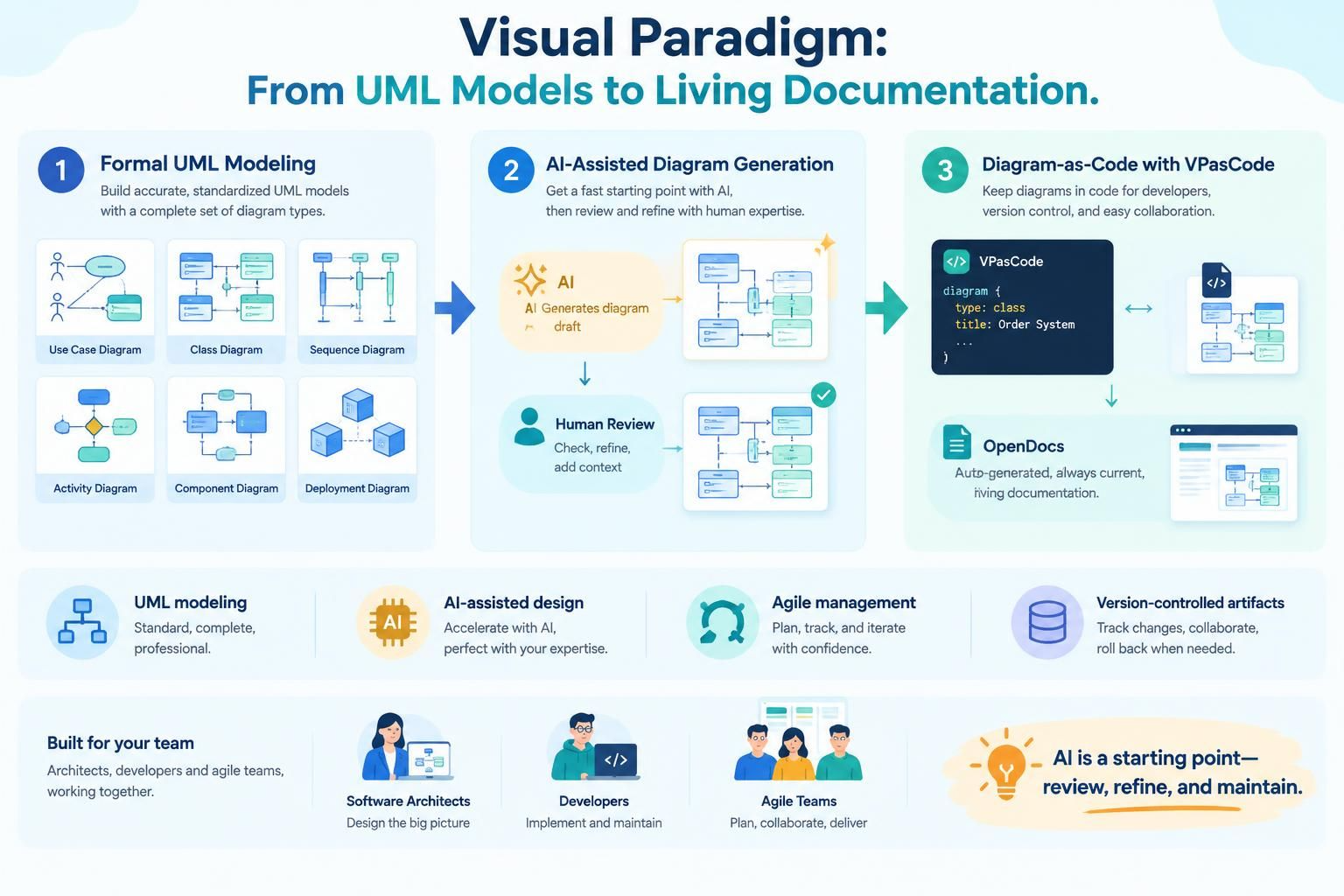
Visual Paradigm has evolved from a traditional UML CASE tool into an integrated ecosystem that combines AI-assisted diagram generation, diagram-as-code (VPasCode), and living documentation (OpenDocs). This guide covers its UML modeling support, AI capabilities, tooling workflow, target users, standout features, practical examples, and tips for getting the most out of the platform.
1. UML Modeling Support in Visual Paradigm
Visual Paradigm supports the full UML 2.x diagram spectrum, along with SysML, BPMN, ERD, DFD, and dozens of other notations. For UML specifically, the tool covers:
-
Structural diagrams: Class, Component, Deployment, Package, Object, Composite Structure
-
Behavioral diagrams: Use Case, Sequence, Activity, State Machine, Communication, Interaction Overview, Timing
Beyond drawing, the platform offers round-trip engineering: generate source code from UML class models (Java, C++, Python, etc.), reverse-engineer code into UML, and synchronize changes. ERD support extends to database schema generation, DDL export, and Hibernate ORM mapping.
A key differentiator is the model repository: diagrams are not isolated images but views into a shared underlying model. Changes in one diagram propagate to related views, ensuring consistency across the project.
2. AI-Assisted Features
Visual Paradigm integrates generative AI at multiple touchpoints:
2.1 AI Diagram Generation from Natural Language
The AI chatbot (accessible in desktop, web, and VPasCode) converts plain-English descriptions into structured UML diagrams. For example, describing “a user login sequence where the frontend sends credentials to an auth service that validates against a database and returns a JWT” produces a sequence diagram with appropriate lifelines and messages. The AI handles layout, relationship detection, and UML-standard notation automatically.
2.2 AI-Assisted Code Correction
When using VPasCode with PlantUML or Mermaid, syntax errors are flagged with specific line numbers, and an “Fix with AI” button proposes corrections. This reduces the friction of debugging diagram-as-code syntax.
2.3 Text Analysis for Model Extraction
Visual Paradigm includes a text analysis tool that identifies keywords and candidate classes from problem descriptions, helping analysts move from requirements text to model elements more quickly.
2.4 State Machine and Behavioral Modeling
The AI state machine generator is particularly refined: it identifies initial states, terminal states, transitions, guards, and events from a lifecycle description. For an order system, for instance, it can generate states like “Order Created,” “Pending,” and “Shipped,” with appropriate cancellation transitions.
3. Tooling Workflow: AI + VPasCode + OpenDocs
The most powerful workflow combines three components:
| Component | Role |
|---|---|
| AI Chatbot | Generate initial diagram logic from natural language prompts |
| VPasCode | Browser-based editor with real-time preview for PlantUML, Mermaid, Graphviz, and D2 |
| OpenDocs | Living documentation that embeds diagrams and auto-updates when source code changes |
Workflow steps:
-
Prompt the AI: Describe the system or diagram you need.
-
Review generated code: The AI outputs PlantUML or Mermaid code, which you can open directly in VPasCode.
-
Refine in VPasCode: Adjust styling, add missing relationships, or fix logical gaps using the live preview.
-
Publish to OpenDocs: Embed the diagram in documentation; updates to the code automatically reflect in the rendered document.
This pipeline eliminates the “export-stale-screenshot” problem that plagues traditional documentation workflows.
4. Who Benefits?
| Role | Primary Value |
|---|---|
| Software Architects | Rapid prototyping of system structure; AI-generated drafts accelerate design exploration |
| Business Analysts | Use case and state machine generation from requirement text; BPMN-UML bridging |
| Developers | Diagram-as-code fits into Git workflows; round-trip engineering keeps code and model aligned |
| Project Managers | Integrated Scrum/Agile tools, burndown charts, and user story mapping alongside modeling |
| Students & Educators | Free Community Edition covers all UML diagram types (with watermark on printouts) |
| Technical Writers | OpenDocs keeps architecture documentation synchronized with source diagrams |
Caveat: Reviewers consistently note a learning curve due to the breadth of features, and pricing is higher than simpler tools like Draw.io or StarUML. Teams needing only basic UML may find the full platform overkill.
5. Standout Features
Diagram-as-Code with Multi-Engine Support
VPasCode uniquely supports PlantUML, Mermaid, Graphviz, and D2 in a single editor, with auto-detection of syntax and instant rendering.
Living Documentation via OpenDocs
Unlike static exports, OpenDocs embeds diagrams as live components. Push a change in VPasCode, and the documentation updates automatically.
Round-Trip Engineering
Code-to-model and model-to-code synchronization is built in, not bolted on. This is rare among mid-tier UML tools.
Visual Modeling + Agile Management
The same platform handles UML diagrams, Scrum backlogs, user story maps, and burndown charts—useful for teams that want a single tool rather than a fragmented stack.
Cross-Platform Consistency
Desktop (Windows/Linux/macOS), web, and VPasCode all access the same projects and model repository.
6. Example Diagram with PlantUML Code
Below is a use case diagram for a library management system, written in PlantUML. This example demonstrates the syntax Visual Paradigm’s AI would generate and VPasCode would render.
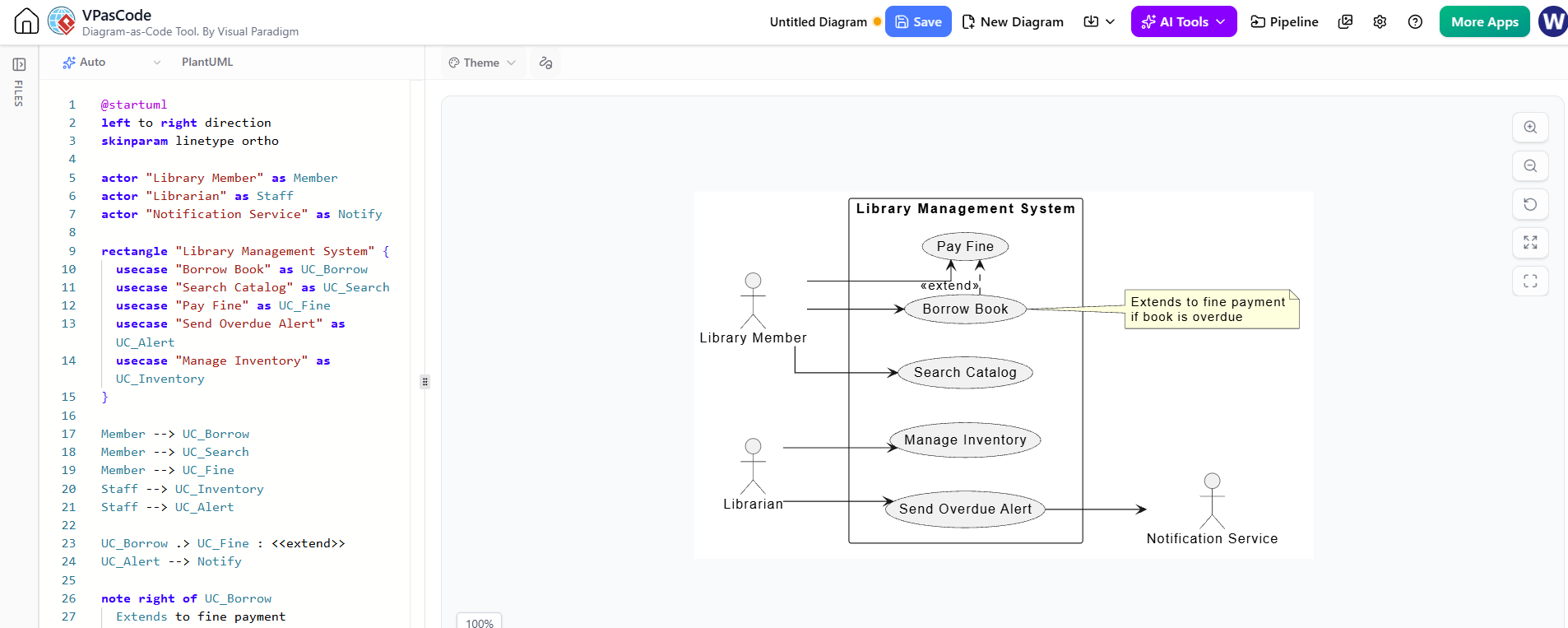
@startuml
left to right direction
skinparam linetype ortho

actor "Library Member" as Member
actor "Librarian" as Staff
actor "Notification Service" as Notify

rectangle "Library Management System" {
  usecase "Borrow Book" as UC_Borrow
  usecase "Search Catalog" as UC_Search
  usecase "Pay Fine" as UC_Fine
  usecase "Send Overdue Alert" as UC_Alert
  usecase "Manage Inventory" as UC_Inventory
}

Member --> UC_Borrow
Member --> UC_Search
Member --> UC_Fine
Staff --> UC_Inventory
Staff --> UC_Alert

UC_Borrow .> UC_Fine : <<extend>>
UC_Alert --> Notify

note right of UC_Borrow
  Extends to fine payment
  if book is overdue
end note

@enduml
How to use this in Visual Paradigm:
-
Paste the code into VPasCode (or ask the AI chatbot to generate a similar diagram from a description).
-
The live preview renders the diagram with orthogonal connectors and actor association coloring.
-
Refine as needed, then publish to OpenDocs or export as an image/model.
7. Tips and Tricks
Start with AI, finish with code. Treat AI-generated diagrams as 80% drafts. Open the result in VPasCode to fix logical gaps, adjust styling (e.g., skinparam linetype ortho), and ensure naming consistency.
Version-control your diagrams. Store PlantUML/Mermaid files in Git alongside application code. This makes architecture changes reviewable via diff and reversible if needed.
Use “As-Is” vs. “To-Be” comparison. Visual Paradigm supports one-click modeling of current and future-state processes. Comparing them highlights exactly what needs to change in a transformation initiative.
Leverage the resource catalog. When drawing BPMN or UML manually, the resource catalog suggests contextually appropriate shapes, reducing time spent hunting through palettes.
Enable real-time validation. The built-in rule checker flags invalid UML/BPMN constructs as you work—useful for teams that need standards compliance without memorizing every rule.
Use OpenDocs for stakeholder reviews. Share a link to living documentation rather than PDF exports. Stakeholders see the current state of diagrams without version confusion.
Explore the Community Edition first. If you’re evaluating for a small team or academic use, the free Community Edition supports all UML diagram types with limited export options—enough to assess fit before committing to a paid license.
8. Limitations to Consider
-
Cost: Full-featured editions are priced higher than many competitors; small teams may find the per-seat licensing significant.
-
Complexity: The breadth of features means onboarding time is non-trivial. Users seeking a lightweight drawing tool may prefer simpler alternatives.
-
AI output still needs review: Generated diagrams are structurally sound but may miss domain-specific nuances or naming conventions. Human oversight remains essential.
-
UI pace of modernization: Some long-time users note the interface, while improved, still carries legacy complexity compared to newer cloud-native tools.
Visual Paradigm’s strength lies in bridging the gap between formal UML modeling, developer-friendly diagram-as-code, and AI-accelerated design. For teams already invested in UML or those seeking a single platform for modeling, documentation, and agile management, it offers a depth that few competitors match. The key is treating AI as a starting point rather than a finished product—and letting VPasCode and OpenDocs carry the diagram from draft to maintained, version-controlled artifact.