

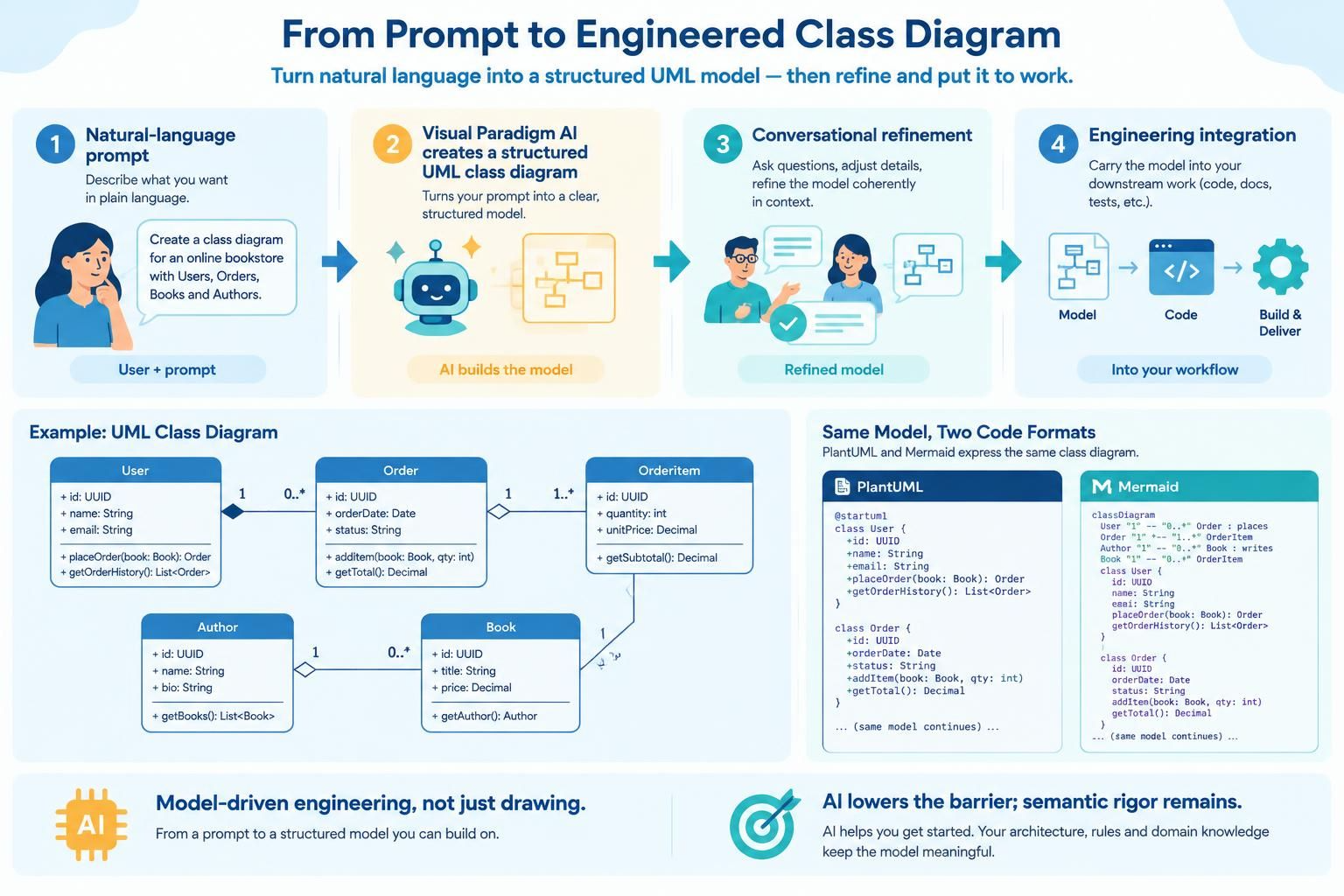
Bottom line up front: Visual Paradigm transforms class diagramming from a manual drawing exercise into a model-driven engineering activity. Its AI assistant can generate a structured, semantically valid class diagram from a single natural-language prompt, then cascade changes across the entire model when you refine it . This guide covers why that matters, who benefits, how to use the tool effectively, and provides ready-to-use PlantUML and Mermaid code for the same example so you can compare approaches.
1. Why Visual Paradigm for Class Diagrams?
Most UML tools fall into two camps: drawing tools that produce pictures, and modeling tools that produce semantic models. Visual Paradigm sits firmly in the second camp. When you draw a class diagram, you are not placing shapes; you are instantiating metaclasses that conform to the UML 2.x specification . This distinction has practical consequences:
-
Syntax validation in real time. The engine checks your diagram against UML rules and flags logical errors before they reach your codebase .
-
Model-view consistency. Rename a class in one diagram, and every other diagram referencing it updates automatically. This is impossible in pure drawing tools .
-
Downstream engineering. A well-formed class model can generate source code, database schemas, and Hibernate ORM mappings, or be reverse-engineered from existing databases .
The AI layer adds a new dimension: conversational modeling. Instead of dragging class boxes and configuring properties, you describe your domain in plain language and let the AI produce a first draft that you then refine .
2. Who Benefits?
| Role | Primary Benefit |
|---|---|
| Software Architects | Rapid domain modeling and architecture exploration; AI generates candidate structures you can critique and refine rather than starting from a blank canvas |
| Agile Teams | Translate user stories into engineering models during sprint design sessions; the AI chatbot accepts natural-language requirements and returns structured diagrams |
| Developers learning UML | The 10-Step Wizard provides educational tips at each stage, explaining why certain modeling choices are made |
| Database Designers | Class models flow directly into ERD generation and DDL scripts; reverse engineering keeps models synchronized with live schemas |
| Technical Writers | OpenDocs integration lets class diagrams live inside documentation and update as the model evolves |
3. The AI-Assisted Workflow: From Prompt to Model
3.1 Conversational Generation (Chatbot Mode)
The fastest path from idea to diagram. Open the AI chatbot interface and describe your system :
“Generate a class diagram for a library management system with Member, Book, Loan, Reservation, Librarian, and Fine. Include attributes, associations with multiplicities, and inheritance where appropriate.”
The AI returns a preliminary UML class diagram with entity classes, fields, methods, and relationships. From there, you refine conversationally:
-
Rename with cascade: “Rename ‘Member’ to ‘Patron’.” The AI updates the class name and all associated references, attributes, and relationship endpoints across the model .
-
Add encapsulation: “Add a ‘status’ attribute to Loan with getter and setter methods.” The class compartment regenerates with the new field and operations in the correct locations .
When satisfied, click Import to Visual Paradigm to bring the model into your desktop workspace as a fully editable, model-based diagram .
3.2 Structured Generation (10-Step Wizard)
For teams that need consistency and educational guardrails, the wizard breaks class diagram creation into logical stages :
-
Define Purpose & Scope — AI suggests refined scope statements and flags potential boundary issues.
-
Brainstorm Core Entities — AI suggests additions based on common domain patterns.
-
Specify Attributes — AI recommends data types and common auditing fields.
-
Define Operations — AI proposes method signatures based on attributes and domain verbs.
-
Establish Relationships — AI suggests multiplicities, roles, and navigability.
-
Review and Organize — Catch inconsistencies before finalizing.
-
Validation Checklist — Automated checks for completeness.
-
Add Notes — AI-generated contextual annotations.
-
Generate Diagram — Clean layout and notation.
-
Report — AI-driven critique identifying potential design patterns and improvement suggestions .
3.3 Quality Checks and Validation
The AI generator includes built-in structural validation: every class should have at least one attribute or method; every relationship should connect valid classes; the diagram should have a defined purpose . These checks prevent the most common class diagram anti-patterns: orphan classes, empty compartments, and dangling associations.
4. Example Diagram: Library Management System
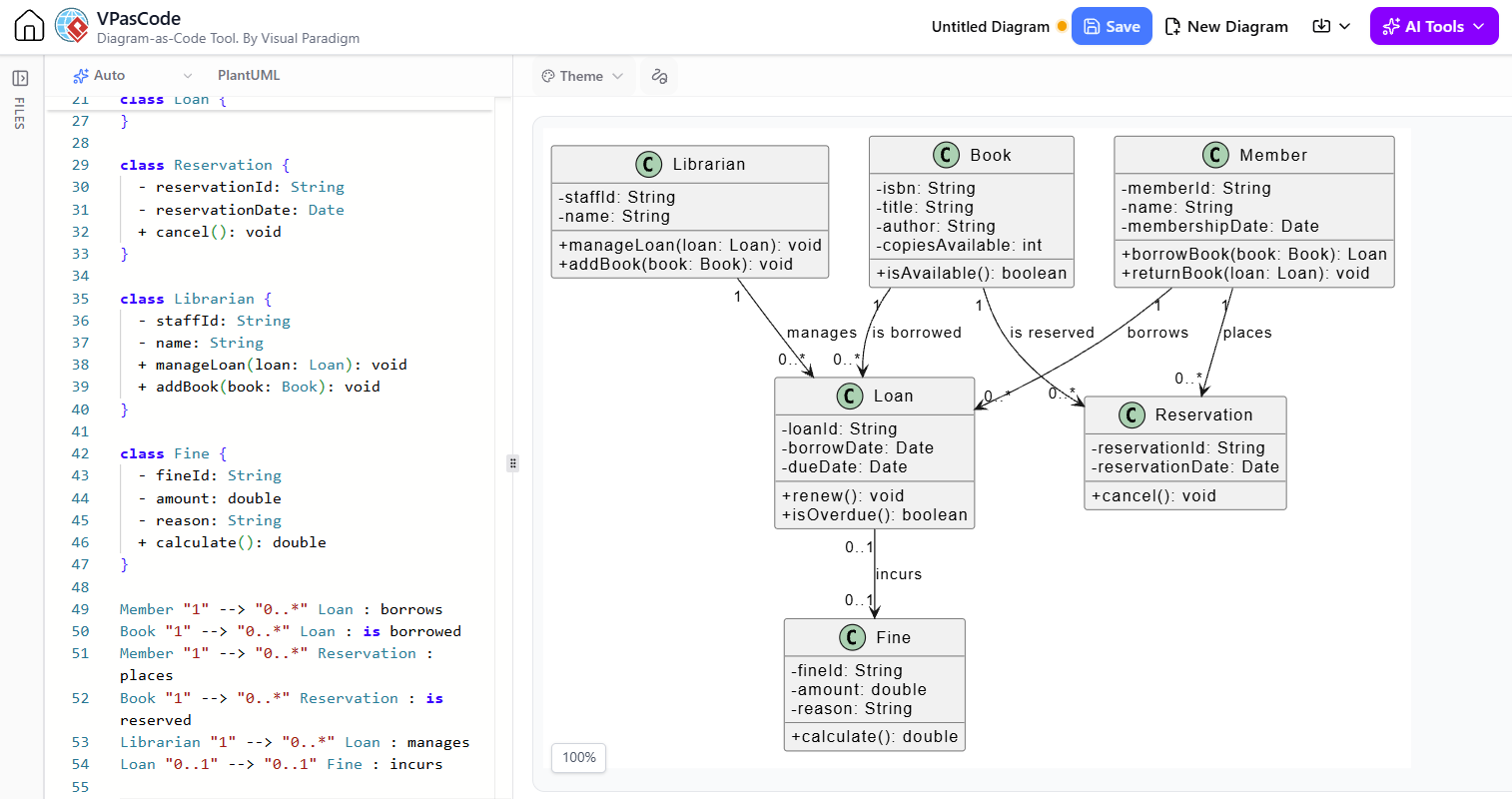
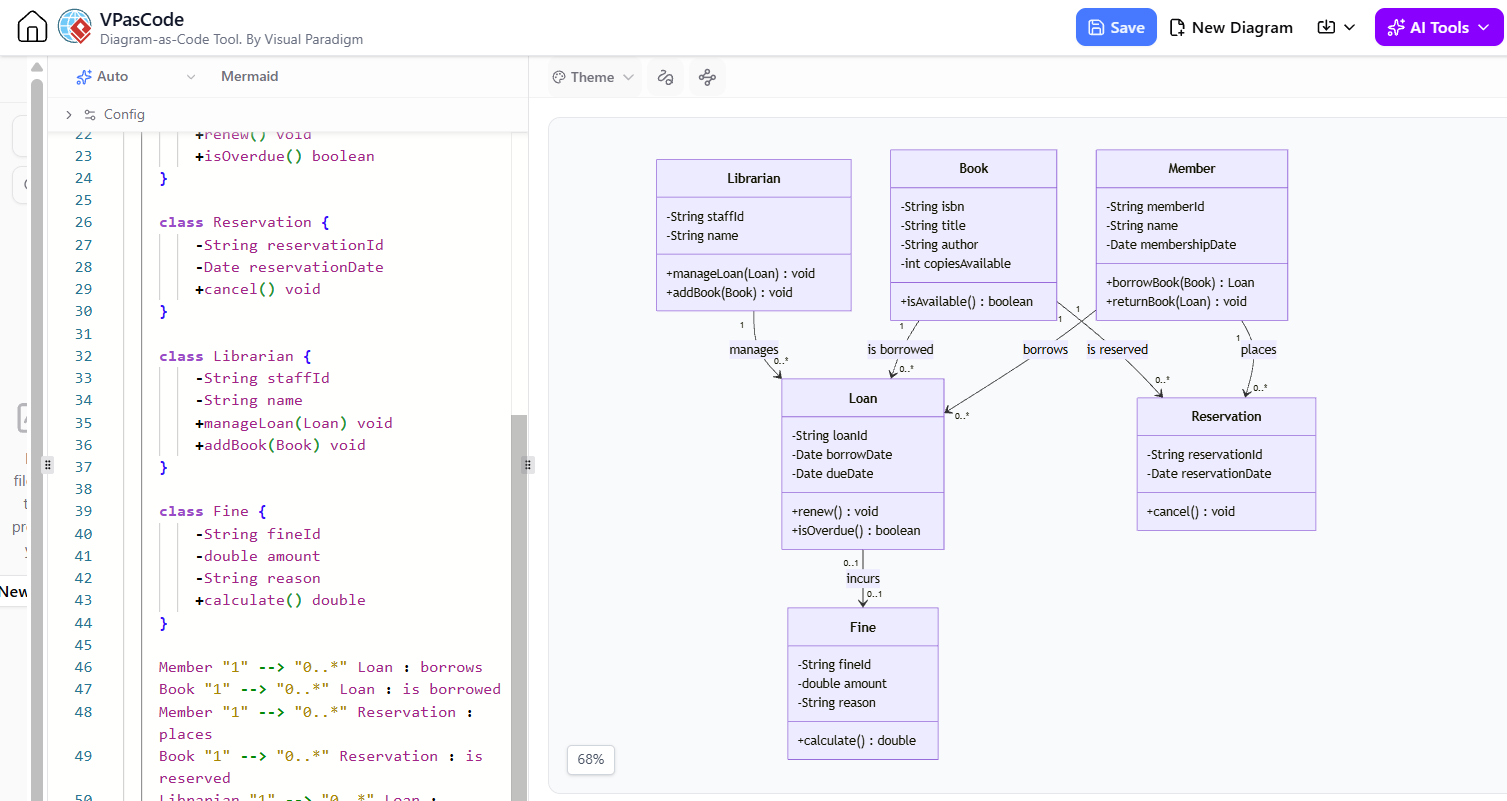
Below is the same domain modeled in both PlantUML and Mermaid, so you can see how the concepts translate across tools. This corresponds to the domain Visual Paradigm’s AI generates when prompted with a library system description .
4.1 PlantUML Version
@startuml
skinparam classAttributeIconSize 0
skinparam shadowing false

class Member {
  - memberId: String
  - name: String
  - membershipDate: Date
  + borrowBook(book: Book): Loan
  + returnBook(loan: Loan): void
}

class Book {
  - isbn: String
  - title: String
  - author: String
  - copiesAvailable: int
  + isAvailable(): boolean
}

class Loan {
  - loanId: String
  - borrowDate: Date
  - dueDate: Date
  + renew(): void
  + isOverdue(): boolean
}

class Reservation {
  - reservationId: String
  - reservationDate: Date
  + cancel(): void
}

class Librarian {
  - staffId: String
  - name: String
  + manageLoan(loan: Loan): void
  + addBook(book: Book): void
}

class Fine {
  - fineId: String
  - amount: double
  - reason: String
  + calculate(): double
}

Member "1" --> "0..*" Loan : borrows
Book "1" --> "0..*" Loan : is borrowed
Member "1" --> "0..*" Reservation : places
Book "1" --> "0..*" Reservation : is reserved
Librarian "1" --> "0..*" Loan : manages
Loan "0..1" --> "0..1" Fine : incurs

@enduml
4.2 Mermaid Version
classDiagram
    class Member {
        -String memberId
        -String name
        -Date membershipDate
        +borrowBook(Book) Loan
        +returnBook(Loan) void
    }

    class Book {
        -String isbn
        -String title
        -String author
        -int copiesAvailable
        +isAvailable() boolean
    }

    class Loan {
        -String loanId
        -Date borrowDate
        -Date dueDate
        +renew() void
        +isOverdue() boolean
    }

    class Reservation {
        -String reservationId
        -Date reservationDate
        +cancel() void
    }

    class Librarian {
        -String staffId
        -String name
        +manageLoan(Loan) void
        +addBook(Book) void
    }

    class Fine {
        -String fineId
        -double amount
        -String reason
        +calculate() double
    }

    Member "1" --> "0..*" Loan : borrows
    Book "1" --> "0..*" Loan : is borrowed
    Member "1" --> "0..*" Reservation : places
    Book "1" --> "0..*" Reservation : is reserved
    Librarian "1" --> "0..*" Loan : manages
    Loan "0..1" --> "0..1" Fine : incurs
Key relationship semantics: The --> notation in both versions represents a directed association. For stronger whole-part relationships, PlantUML uses *-- for composition (filled diamond) and o-- for aggregation (hollow diamond); Mermaid uses *-- and o-- respectively . The library model above uses simple associations because a Loan does not own a Book in the composition sense—the book survives the loan.
5. Standout Features
5.1 Model-Based, Not Drawing-Based
Visual Paradigm’s core differentiator is its metamodel foundation. Every class you create is a semantic entity with properties, operations, and relationships that other diagrams can reference. This is why renaming cascades work, and why code generation produces compilable output rather than pseudo-code .
5.2 AI That Understands UML Semantics
The AI assistant does not just generate boxes and lines. It understands class vs. interface vs. enumeration distinctions, visibility modifiers, multiplicity notation, and relationship semantics. When you ask for a composition relationship, you get a filled diamond, not a plain arrow .
5.3 The 10-Step Wizard as a Teaching Tool
Most AI code/diagram generators are black boxes. Visual Paradigm’s wizard exposes the reasoning at each step and includes educational tips explaining object-oriented analysis concepts like noun-phrase identification and CRC cards . This makes it suitable for training environments, not just production work.
5.4 End-to-End Engineering
The class diagram is not an endpoint. From the same model you can generate Java/C#/C++ code, create ERD diagrams, produce database DDL, generate Hibernate mappings, and export documentation . The AI-generated model is a first-class citizen in this pipeline, not a throwaway sketch.
5.5 Free Community Edition
The community edition is not a trial. It has no time limit and supports all 14 UML diagram types, SysML, and ERD with the same modeling engine as the paid versions . The only limitation is a subtle watermark on printed/exported images. For students, open-source contributors, and individual learners, this removes the cost barrier entirely.
6. Tips and Tricks
Tip 1: Use the AI for the first draft, then switch to manual refinement. The AI excels at breadth (getting 6–8 classes with attributes and relationships quickly). Manual editing excels at depth (adding precise multiplicities, stereotypes, and constraints). The import-to-desktop workflow is designed for exactly this hybrid approach .
Tip 2: Leverage cascade renaming aggressively. When the AI generates a class with a name that does not match your domain vocabulary, rename it immediately. Every attribute reference, association role, and method parameter updates automatically. This is where model-based tools dramatically outperform drawing tools .
Tip 3: Run the validation checklist before importing. The wizard’s built-in checks catch empty classes and orphan relationships. Fixing these in the AI interface is faster than fixing them in the full editor .
Tip 4: Use the Resource Catalog for relationships. In manual mode, hovering over a class reveals a resource catalog icon. Drag from it to another class to create an association with pre-configured multiplicity options—faster than drawing lines and editing properties afterward .
Tip 5: Start with a domain model, not a design model. When prompting the AI, explicitly request a domain model first (conceptual entities, no operations). Add operations and visibility in a second pass. This mirrors good OOA practice: understand the vocabulary before designing the behavior .
Tip 6: Export early and often. Even if you plan to refine in the full editor, export the AI-generated diagram to PlantUML or Mermaid for version control. Text-based diagram formats diff cleanly in Git, while binary project files do not.
Tip 7: Watch the learning curve. Gartner reviewers consistently note that Visual Paradigm is powerful but complex for new users . The AI features actually help here: the 10-Step Wizard and chatbot interface provide a guided on-ramp that the traditional menu-driven interface does not.
7. Quick Reference: UML Class Notation in Visual Paradigm
| Element | Notation | PlantUML | Mermaid |
|---|---|---|---|
| Class | Rectangle with 3 compartments | class Name |
class Name |
| Association | Solid line, open arrow | A --> B |
A --> B |
| Inheritance | Solid line, hollow triangle | `A < | — B` |
| Interface realization | Dashed line, hollow triangle | `A < | .. B` |
| Composition | Solid line, filled diamond | A *-- B |
A *-- B |
| Aggregation | Solid line, hollow diamond | A o-- B |
A o-- B |
| Multiplicity | Numbers at line ends | "1" --> "0..*" |
"1" --> "0..*" |
Visual Paradigm’s combination of a rigorous UML metamodel, conversational AI generation, and end-to-end engineering integration makes it a strong choice for teams that treat class diagrams as engineering artifacts rather than presentation slides. The AI features lower the barrier to entry without sacrificing the semantic rigor that makes the models useful downstream. Start with a prompt, refine conversationally, import, and engineer.