


Turn Every Diagram into a Team Advantage: The Visual Paradigm Ecosystem Guide
Great ideas shouldn’t get stuck in a sketch. And important diagrams shouldn’t be stranded in a file only a few people can find.
Visual Paradigm’s ecosystem helps teams connect the work of imagining, modeling, explaining, and sharing. Visual Paradigm Desktop supports detailed modeling. VP Online brings diagramming and other tools into the browser. AI can help teams get a first draft on the page. Pipeline offers a handoff for supported artifacts, and OpenDocs brings diagrams together with the context people need to understand them. The Unified Platform helps teams find and access these tools in one workspace.
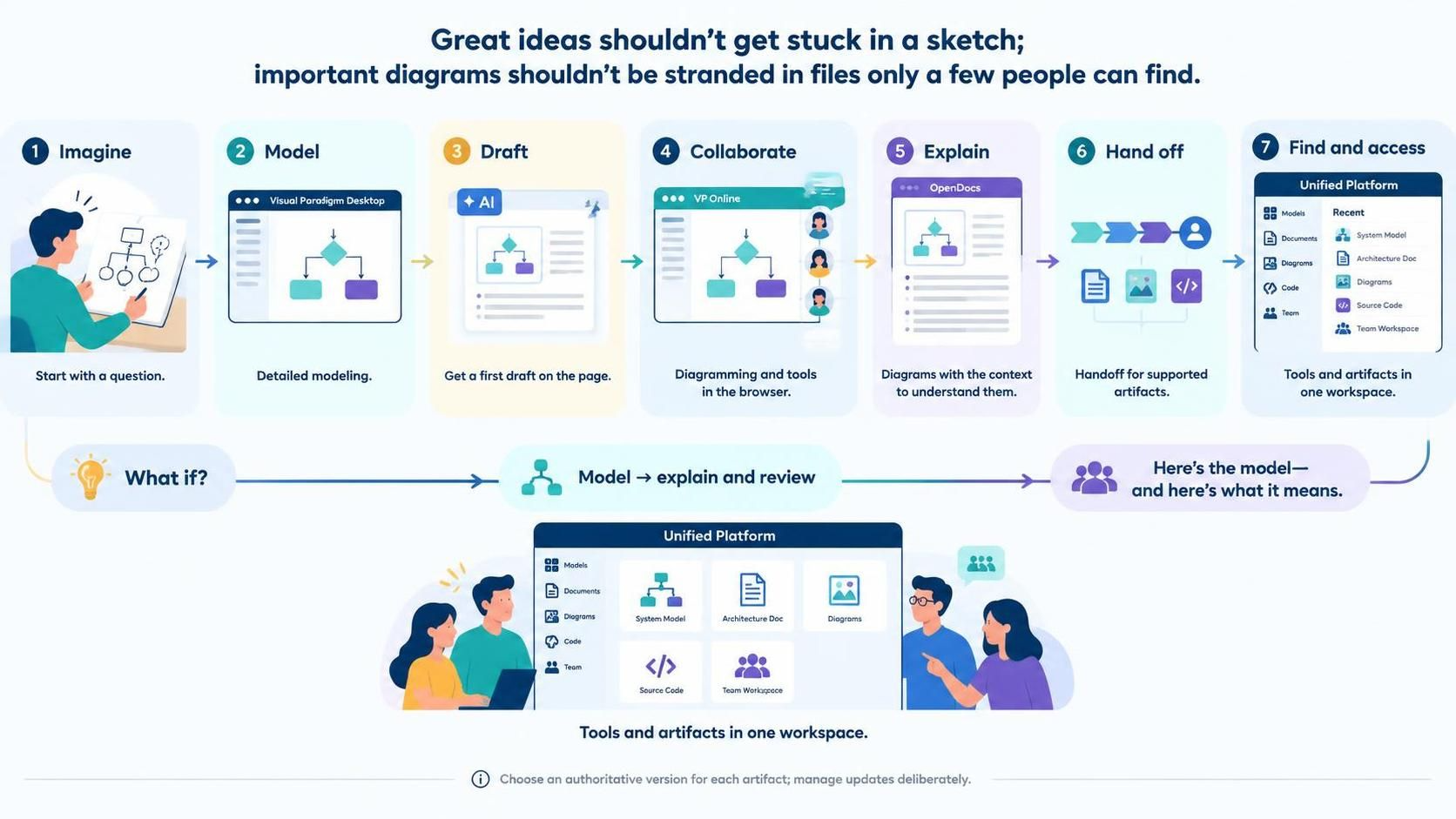
The result is a more intentional path from “What if?” to “Here’s the model—and here’s what it means.”
Make the first step easier
Every project starts with a conversation: a requirement, a process to improve, a system to design, or a question the team needs to answer.
Start where the work feels natural. Use an AI tool to explore an idea or draft a diagram. Sketch in VP Online when browser-based access and collaboration are useful. Open Desktop when the work calls for deeper modeling, refinement, or ongoing project maintenance.
AI can help teams move from a blank page to a working draft—but the team brings the expertise. Review the result against real requirements, check the terminology and relationships, and refine anything that needs to be more precise. The goal isn’t to automate judgment; it’s to give the team a faster starting point.
Give every tool a clear role
A connected workflow works best when each tool has a job:
- Visual Paradigm Desktop is the workbench for detailed models and structured project work.
- VP Online offers browser-based diagramming and online tools for tasks that benefit from web access.
- AI tools help explore ideas and produce drafts that people can review and improve.
- Pipeline provides a handoff route for supported artifacts.
- OpenDocs gives diagrams a home alongside the explanations, decisions, and project notes that make them useful.
- Unified Platform helps the team navigate the broader collection of apps and artifacts.
This isn’t about moving every task into one application. It’s about choosing the right environment for each stage—and making the transition between stages clear.
Move from model to meaning
A diagram can show how something is structured. Documentation can explain why it matters.
With the Desktop-to-OpenDocs Pipeline workflow, teams can send a supported diagram from Desktop and then place it in an OpenDocs page with explanatory text. That creates an opportunity to connect the visual model with its purpose, boundaries, assumptions, and key decisions.
A practical handoff looks like this:
- Open the diagram in Visual Paradigm Desktop.
- Choose Export > Send to OpenDocs Pipeline.
- Add a short comment describing the artifact or its revision.
- In OpenDocs, edit the relevant page and place the cursor where the diagram should appear.
- Choose Insert > Pipeline, select the artifact, and add the context readers need.
The transfer requires cloud connectivity, and the exact workflow can depend on the product version and account setup. The key benefit is the handoff: a reviewed diagram can be presented alongside information that helps others interpret it.
Make the Unified Platform your launchpad
When teams use multiple tools, knowing where to begin can be its own obstacle. The Unified Platform helps by providing a central place to access apps and artifacts across the ecosystem. Desktop users can open it through Team / Unified Platform > Unified Platform, or use it in a browser.
Think of the platform as a launchpad—not a replacement for Desktop, VP Online, Pipeline, or OpenDocs. Each tool still serves its own purpose. The hub makes the broader workflow easier to navigate.
Keep the work connected—and the source clear
More access to tools only helps when people know which version to trust. Decide early where each artifact’s maintained version lives: in a Desktop project, an online artifact, or another team-managed source. Then make documentation and handoffs point back to that source as clearly as possible.
When a model changes, treat the update as a publishing step:
- Revise the diagram in its designated source.
- Send the updated artifact through Pipeline when appropriate.
- Review the OpenDocs page and update the embedded artifact if needed.
- Check that the surrounding explanation still matches the diagram.
Don’t assume that editing one copy automatically updates every other place it appears. A deliberate review keeps shared information aligned and helps prevent outdated diagrams from quietly circulating.
Turn a collection of tools into a team workflow
A simple, repeatable process can make the ecosystem work harder for your team:
Explore. Capture the idea in a prompt, online canvas, or Desktop model.
Refine. Review the draft against requirements and improve it in the environment suited to the task.
Choose the source. Identify the version the team will maintain.
Share with context. Send supported artifacts through Pipeline and explain them in OpenDocs.
Review and update. Assign owners for the model and documentation, and publish changes intentionally.
This approach helps different roles contribute without requiring everyone to work in the same way. A stakeholder can read the documentation, a modeler can refine the project diagram, and a team member can locate the relevant tools through the Unified Platform.
Set the team up for success
A few lightweight habits can make collaboration smoother:
- Use consistent names for projects, diagrams, and revisions.
- Add useful comments when sending artifacts through Pipeline.
- Assign an owner for the maintained model and an owner for its documentation.
- Review AI-generated diagrams before using them as project references.
- Add purpose and assumptions to OpenDocs pages.
- Pilot the workflow on one project before rolling it out broadly.
- Confirm the tools, integrations, and features available under your team’s edition and account.
Conclusion: From disconnected diagrams to shared understanding
Visual Paradigm’s ecosystem offers teams a way to connect early ideas with detailed modeling and accessible documentation. AI can help get a draft started; VP Online can support browser-based work; Desktop can provide a modeling workbench; Pipeline can move supported artifacts toward OpenDocs; and the Unified Platform can make the overall toolset easier to navigate.
The payoff comes from more than creating diagrams. It comes from helping the right people find, understand, review, and maintain them. Establish a clear source of truth, make handoffs deliberate, and give every shared diagram the context it deserves—and your models can become a stronger part of how the team works together.