

Introduction
In modern software development and business analysis, documentation often becomes the first casualty of speed. Teams frequently find themselves trapped in a cycle of “documentation drift,” where static screenshots of architecture diagrams or process flows quickly become obsolete as the underlying systems evolve. This disconnect between living models and static documentation creates silos, increases onboarding time for new team members, and leads to costly miscommunications.
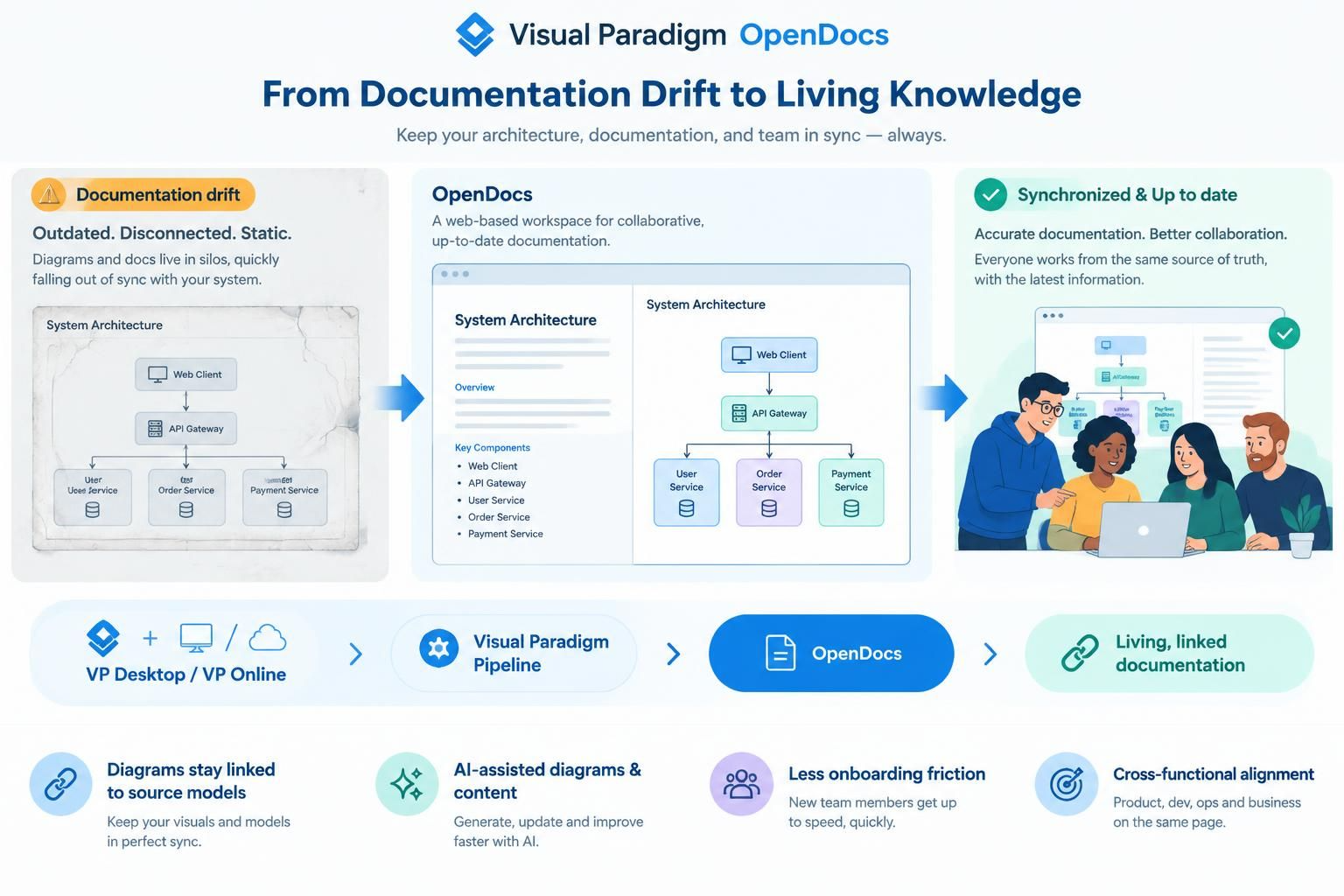
Visual Paradigm OpenDocs emerges as a solution to this persistent challenge by unifying text authoring with visual diagramming in a single, web-based workspace. Unlike traditional wikis that treat images as dead attachments, OpenDocs integrates deeply with the Visual Paradigm ecosystem through the “Pipeline.” This integration allows teams to push complex models from tools like VP Desktop or VP Online directly into their documentation, ensuring that every diagram remains linked to its source model. By leveraging AI for both diagram generation and content drafting, OpenDocs transforms documentation from a maintenance burden into a dynamic, synchronized knowledge base that evolves alongside your projects.
Core Capabilities of OpenDocs
OpenDocs is designed to bridge the gap between technical modeling and narrative explanation. It provides a flexible environment where structured notes and visual assets coexist seamlessly.
Writing and Organization
At its heart, OpenDocs offers a robust writing experience supporting both Markdown and a visual editor. Content is organized within a tree-like folder structure, allowing teams to create hierarchical knowledge bases that mirror their project structures. This approach makes it easy to navigate complex documentation sets, from high-level overviews to detailed technical specifications.
Built-In and AI-Powered Diagramming
One of the standout features of OpenDocs is its ability to generate visuals on demand. Users can create flowcharts, UML diagrams, mind maps, and entity relationship diagrams manually or by using plain-English AI prompts. This lowers the barrier to entry for non-technical stakeholders who need to visualize concepts without mastering complex modeling syntax. For those who prefer code-based approaches, the platform supports diagram-as-code workflows, integrating seamlessly with text-based modeling standards.
Web-Based Accessibility and Sharing
As a browser-based tool, OpenDocs eliminates the need for local installations, making it accessible to distributed teams. Knowledge bases can be shared via simple links, facilitating easy collaboration with external stakeholders, clients, or cross-functional teams who may not have access to specialized modeling software.
The Power of the Visual Paradigm Pipeline
The true differentiator of OpenDocs is not just its editing capabilities, but its integration with the broader Visual Paradigm ecosystem via the Pipeline. This cloud-based asset and revision bridge ensures that documentation remains accurate and up-to-date.
Seamless Integration with Core Components
-
Visual Paradigm Desktop: Power users can model complex enterprise architectures, BPMN processes, or SysML diagrams in the desktop application and push them directly to the OpenDocs Pipeline. When changes are made to the source model, the Pipeline tracks revisions, allowing document authors to swap in updated diagrams with a single click.
-
VP Online: Browser-based diagramming tools allow teams to create and update visuals without local software. These diagrams can be sent directly to the Pipeline, ensuring that web-based modeling efforts are immediately available for documentation.
-
VPasCode: For developers who prefer text-based modeling, VPasCode supports syntaxes like PlantUML and Mermaid. Diagrams generated from code can be routed through the Pipeline, enabling version-controlled diagram sources that render cleanly in OpenDocs.
-
AI Diagramming Chatbot: The ecosystem’s AI tools can generate initial diagram structures from natural language prompts. These AI-generated visuals can be refined and then pushed to the Pipeline, accelerating the ideation phase of documentation.
The Sync and Revision Workflow
The workflow for maintaining living documentation is straightforward and efficient:
-
Send to Pipeline: Export or commit a diagram from VP Desktop, VP Online, or VPasCode to the OpenDocs Pipeline.
-
Insert into OpenDocs: Use the “Insert > Pipeline” feature in the OpenDocs editor to embed the artifact.
-
Update and Swap: When the source model is updated, the Pipeline panel in OpenDocs flags the availability of a new revision. Authors can review the changes and swap the old diagram for the new one, ensuring the documentation always reflects the current state of the project.
High-Value Use Cases
The combination of OpenDocs and the Visual Paradigm ecosystem supports several critical business and technical workflows.
Living Software Architecture and C4 Specs
Software architects can maintain complex system component diagrams, sequence flows, and database ERDs in VP Desktop. As the architecture evolves across sprints, updates are committed to the Pipeline and swapped into OpenDocs. This eliminates the need to rebuild documentation pages manually, ensuring that architectural specs remain accurate and trustworthy.
Rapid AI-to-Knowledge-Base Ideation
Product managers and analysts can use the AI Visual Modeling Chatbot to generate initial use case diagrams or C4 context diagrams from plain-English prompts. Once refined, these visuals are sent to the Pipeline, and OpenDocs’ AI writing tools can draft surrounding requirements, user stories, and acceptance criteria, significantly speeding up the initial documentation phase.
Diagram-as-Code Engineering Wikis
Development teams that prefer text-based modeling can write PlantUML or Mermaid syntax in VPasCode. These diagrams are pushed to the Pipeline and embedded alongside API specs and runbooks in OpenDocs. This approach keeps engineering diagrams version-controlled in code repositories while presenting clean, readable documentation to non-technical stakeholders.
Cross-Functional Business Process Hubs
Business analysts can map operational workflows using BPMN in VP Online or Desktop, while operations teams write Standard Operating Procedures (SOPs) in OpenDocs. Stakeholders can view the latest process maps and step-by-step instructions in a single browser workspace, reducing the friction between process design and execution.
Interactive Client and Stakeholder Portals
Consultants and product teams can combine technical architecture notes with interactive Flipbooks and Bookshelves routed through the Pipeline. This allows for the creation of secure, read-only links for external clients, facilitating project reviews and sign-offs without exposing internal modeling tools.
Why This Combination Stands Out
The integration of OpenDocs with the Visual Paradigm ecosystem addresses several key pain points in modern knowledge management:
-
Eliminates Documentation Drift: By keeping visuals linked to their source models with tracked revisions, teams avoid the common pitfall of outdated static images.
-
Matches the Right Tool to Each Role: Power users get deep engineering features in VP Desktop, developers get text-based speed in VPasCode, and writers get a clean editor in OpenDocs. All roles contribute to a single source of truth.
-
End-to-End AI Acceleration: AI assists across the entire lifecycle, from generating initial diagrams to drafting textual explanations, reducing the manual effort required to maintain comprehensive documentation.
-
Reduces Context Switching: By centralizing creation and publication within the Visual Paradigm Unified Platform, teams reduce the overhead of managing disparate files and tools, leading to faster onboarding and more efficient collaboration.
Conclusion
Visual Paradigm OpenDocs represents a significant shift in how teams approach documentation. By moving away from static, disconnected files and embracing a living, synchronized knowledge base, organizations can ensure that their documentation remains a valuable asset rather than a bureaucratic hurdle. The integration with the Visual Paradigm Pipeline ensures that diagrams are always up-to-date, while AI capabilities accelerate both visual and textual content creation. For teams looking to streamline their knowledge management, reduce documentation debt, and improve cross-functional collaboration, the OpenDocs ecosystem offers a powerful and cohesive solution.
Recommended Reading: Visual Paradigm AI Ecosystem
-
Visual Paradigm OpenDocs Comprehensive Guide: A detailed overview of OpenDocs features, including writing tools, diagramming capabilities, and integration workflows.
-
From Concept to Documentation: How Visual Paradigm OpenDocs Unifies AI-Powered Modeling: Explores the synergy between AI diagram generation and knowledge management in OpenDocs.
-
Visual Paradigm Pipeline: A Comprehensive Guide: Explains how the Pipeline acts as a cloud-based bridge for syncing diagrams and assets across the Visual Paradigm ecosystem.
-
A Case Study on Streamlining Knowledge Management with Visual Paradigm OpenDocs Pipeline: Real-world examples of how teams use the Pipeline to eliminate documentation drift and improve collaboration.
-
Visual Paradigm AI Tooling: A Step-by-Step Guide to the AI Chatbot, C4, Pipeline, and OpenDocs Workflow: A practical walkthrough of using AI tools to generate diagrams and integrate them into OpenDocs.
-
From Silos to Synergy: How Visual Paradigm OpenDocs Transforms Team Documentation: Discusses how OpenDocs breaks down barriers between technical and non-technical teams through visual collaboration.
-
Architecture as Code: Building Self-Updating Documentation with Visual Paradigm AI-Assisted UML and OpenDocs Pipeline: Focuses on diagram-as-code workflows and how they integrate with OpenDocs for engineering teams.
-
Visual Paradigm Unified Platform: A Practical Guide: Overview of the Unified Platform as a central hub for accessing Visual Paradigm tools, including OpenDocs.