

Introduction
A team rarely begins a project with a finished model. It starts with a question, a rough idea, or a requirement that needs to be understood. Over time, that idea becomes a diagram, the diagram becomes part of a design, and the design needs an explanation people can review and use.
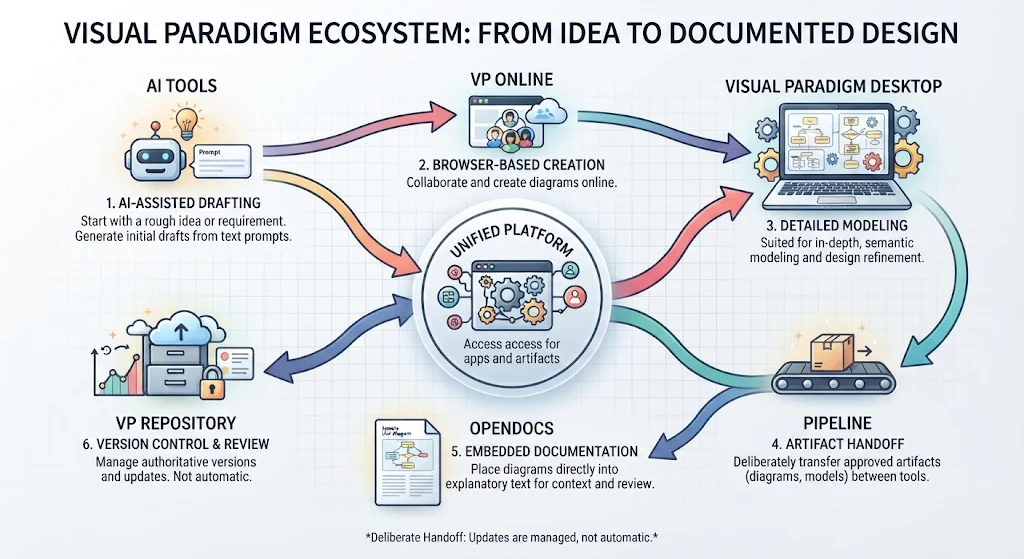
Visual Paradigm’s ecosystem can support that journey. Desktop is suited to detailed modeling; VP Online offers browser-based tools; AI can help create an initial draft; Pipeline can transfer supported artifacts; OpenDocs can place diagrams beside explanatory text; and the Unified Platform provides a central way to find apps and artifacts. The experience works best when the team treats each handoff as a deliberate step—not as a guarantee that every tool automatically updates every other one.
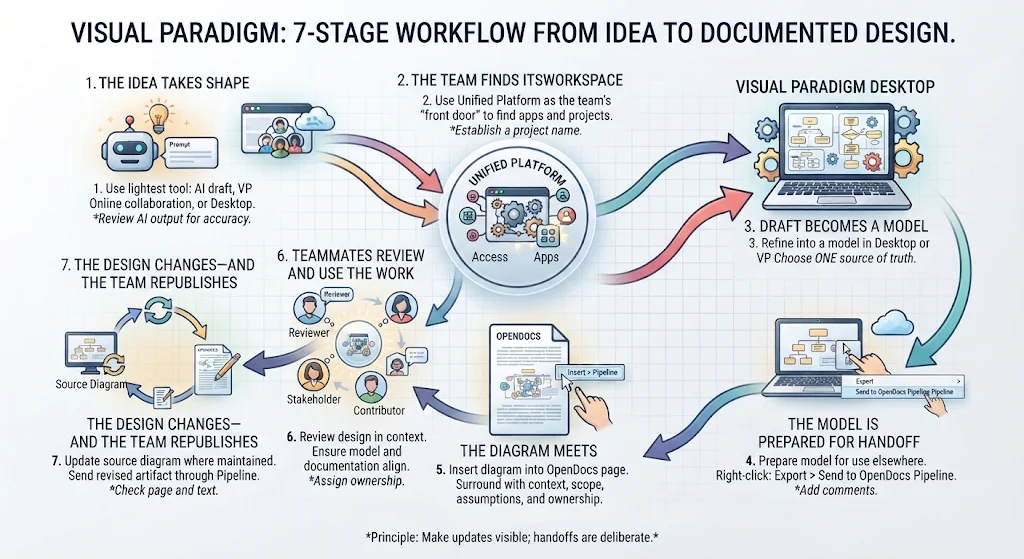
Stage 1: The idea takes shape
The journey begins when someone needs to describe a process, system, or design decision. Perhaps the team has a written requirement, a workshop discussion, or an early concept that is difficult to communicate in words alone.
At this point, choose the lightest tool that helps the team think together:
-
Use an AI tool to draft a diagram from a prompt, if that capability is available.
-
Use VP Online when browser-based diagramming or collaboration is convenient.
-
Start directly in Desktop when the model is already well defined or needs a structured project from the outset.
AI-generated diagrams are starting points, not approvals. Have the people who understand the requirements check the result for missing information, incorrect relationships, and unclear terminology before treating it as a design.
Stage 2: The team finds its workspace
As the work grows, teammates need a reliable way to find the tools and artifacts they are using. The Unified Platform serves as a central access point for Visual Paradigm apps and artifacts. Desktop users can open it through Team / Unified Platform > Unified Platform; it is also available in a browser.
Rather than thinking of the hub as the place where all modeling happens, think of it as the team’s front door: a place to locate work and launch the appropriate app. The modeling or documentation itself still happens in the relevant component.
A small agreement at this stage saves confusion later: give the project a recognizable name, decide where the maintained model will live, and make sure teammates can access the relevant workspace.
Stage 3: A draft becomes a model
Once the idea is clear enough to develop, the team refines it into a model. Desktop is the natural choice when the work requires detailed modeling and continued maintenance. VP Online may be more convenient when browser access or collaborative web-based creation is the priority.
The team’s experience improves when it chooses one source of truth for each diagram. That source might be a Desktop project or an online artifact, depending on how the work is being maintained. Exports and embedded copies can help with communication, but they should not be confused with the maintained source.
Before moving forward, ask:
-
Does the diagram reflect the agreed requirements?
-
Are the names and relationships understandable to the intended audience?
-
Who will maintain the source model?
-
Is this a working draft or an approved artifact?
Stage 4: The model is prepared for handoff
A diagram becomes more valuable when it can be understood outside the modeling environment. Before sharing it, give it a meaningful name and decide what readers need to know. A brief comment can also help identify the artifact’s purpose or revision when it appears in the Pipeline.
For a Desktop diagram, the documented handoff is to open the diagram, right-click it, and choose Export > Send to OpenDocs Pipeline. Save the project if prompted, add a comment if useful, and confirm the transfer. This is a cloud handoff, so connectivity is required.
Treat this as a publishing moment: the model is being prepared for use elsewhere, so check that it is ready for its audience.
Stage 5: The diagram meets its explanation
In OpenDocs, the team can put the diagram into a page and surround it with the information that makes it useful. Edit the relevant page, place the cursor where the diagram should appear, choose Insert > Pipeline, and select the artifact.
The accompanying text can explain:
-
What the diagram represents.
-
What is inside or outside its scope.
-
Which assumptions or decisions matter.
-
Who owns the model and when it was reviewed.
This stage changes the reader’s experience. Instead of encountering an unexplained visual, they can understand why it exists and how it relates to the project.
Stage 6: Teammates review and use the work
With the model and its explanation together, teammates can review the design in context. A reviewer can focus on whether the diagram is correct; a stakeholder can focus on whether it communicates the intended idea; and a project contributor can use it to understand what work follows.
The Unified Platform can help the team find or launch the relevant apps and artifacts, while OpenDocs provides the page where the diagram is explained. Assign ownership for both: someone should maintain the model, and someone should keep the documentation page aligned with it.
Stage 7: The design changes—and the team republishes
Projects evolve. Requirements change, reviewers identify issues, and implementation reveals new information. When the source diagram changes, update it where it is maintained and send the revised artifact through the appropriate Pipeline workflow. Then review the OpenDocs page and select or replace the embedded version as needed. Visual Paradigm describes a revision workflow for updating an artifact in OpenDocs.
The important experience principle is make updates visible. Do not assume that changing the Desktop diagram automatically refreshes every embedded copy or document. After publishing a revision, check that the page displays the intended version and that its explanatory text still matches.
A simple journey map
| Team moment | Best-fit activity | Team checkpoint |
|---|---|---|
| “We need to explore this idea.” | Draft with AI, brainstorm, or create a quick online diagram | Is the draft useful enough to review? |
| “We need a dependable model.” | Refine in Desktop or maintain the online artifact | Where is the source of truth? |
| “Others need to understand it.” | Send the supported artifact through Pipeline and place it in OpenDocs | Does the page explain the diagram? |
| “The design has changed.” | Update the source, publish a revision, and review the embedded artifact | Is the documentation showing the intended version? |
Make the journey easier for the team
Keep the process manageable with a few team habits:
-
Use consistent names for projects and artifacts.
-
Add short, informative Pipeline comments when publishing.
-
Assign owners for models and documentation pages.
-
Review AI-generated content before approval.
-
Explain diagrams in plain language for their intended readers.
-
Pilot the workflow with one project before adopting it broadly.
-
Check app access and licensing before making a particular feature part of a team process. Available features can depend on the product edition and account entitlements.
Conclusion
From the user’s point of view, the Visual Paradigm ecosystem is a journey from uncertainty to shared understanding: explore an idea, shape it into a model, hand off an approved artifact, explain it in OpenDocs, and republish it when the design changes.
Desktop, VP Online, AI tools, Pipeline, OpenDocs, and the Unified Platform each contribute to a different moment in that journey. The team gets the clearest experience when it chooses the right tool for each task, identifies a source of truth, and makes handoffs and revisions explicit.