

Introduction
Markmap turns a Markdown outline into an interactive mind map, and Visual Paradigm VPasCode lets you write that Markdown and preview the rendered map in real time. You can use AI to draft or revise the outline, then refine its structure and content in VPasCode. vpascode.com
This case study uses the “Markmap Special Features” example as a complete document, followed by standalone examples for individual features. Since rendering and support for options can vary, test frontmatter and advanced features in VPasCode’s preview before relying on them.
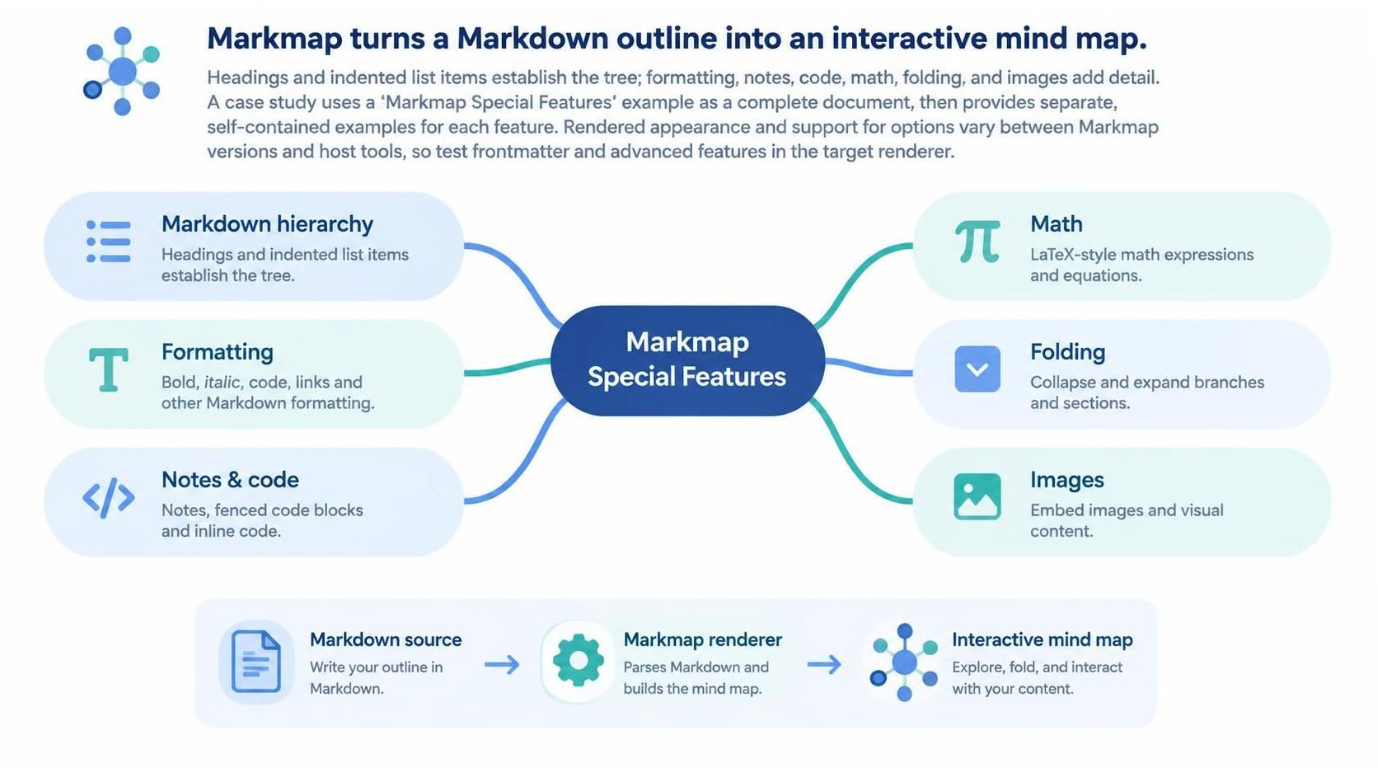
How to read the case study
-
A
#heading is the map’s root topic. -
##and###headings create branches. -
Indented bullets create nested nodes.
-
Paragraphs, tables, and code blocks placed under a branch can serve as attached supporting content rather than ordinary tree nodes.
-
YAML frontmatter and special comments can configure or influence rendering when the renderer supports them.
Complete case study: Markmap Special Features
The following is a complete Markdown document. Save it as a .md file or paste it into a Markmap-compatible editor. Its root topic is “Markmap Special Features,” with five major branches.
Render Markmap using VPasCode Tool:
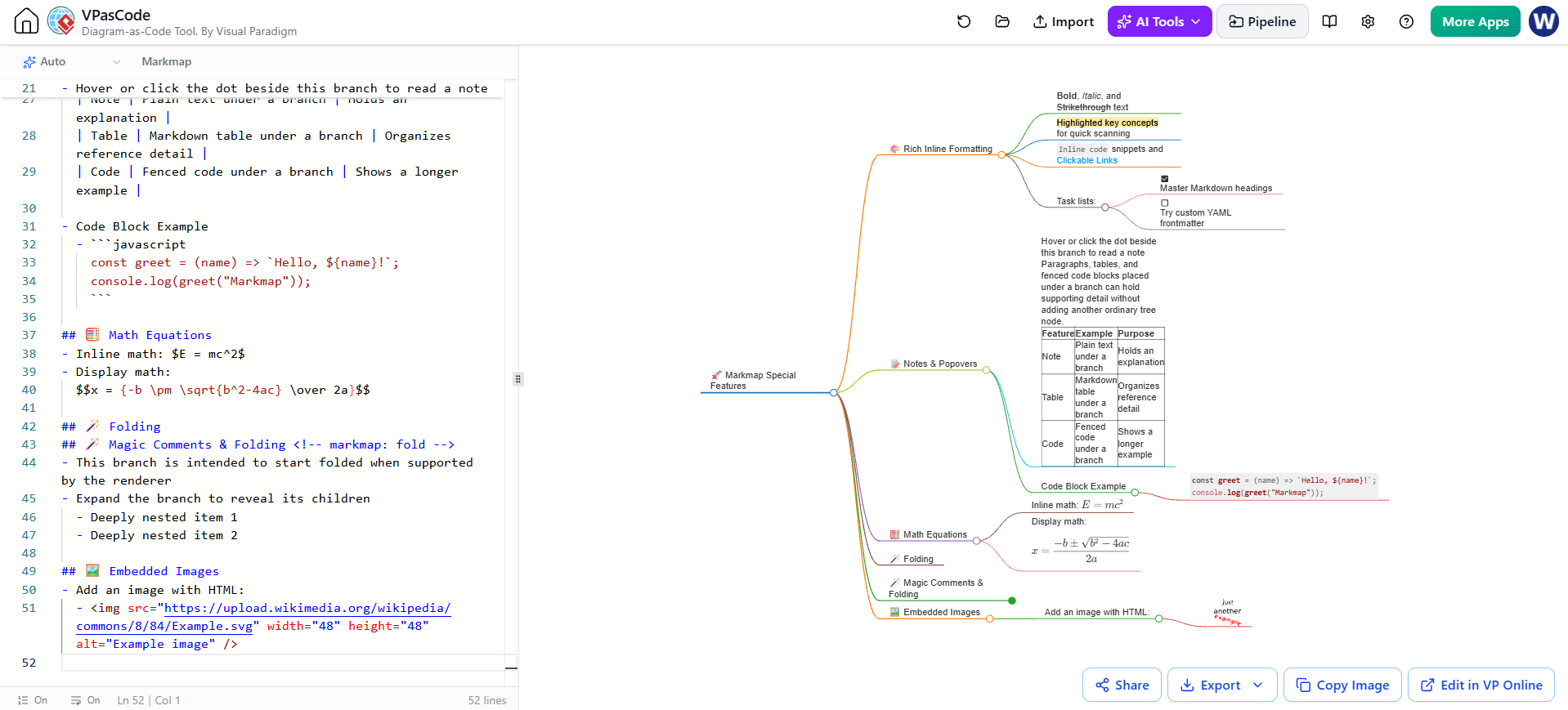
---
markmap:
  theme: cards
  layout: two-sided
  colorScheme: auto
  colorFreezeLevel: 2
  initialExpandLevel: 3
---

# 🚀 Markmap Special Features

## 🎨 Rich Inline Formatting
- **Bold**, *Italic*, and ~~Strikethrough~~ text
- ==Highlighted key concepts== for quick scanning
- `Inline code` snippets and [Clickable Links](https://markmap.js.org/)
- Task lists:
  - [x] Master Markdown headings
  - [ ] Try custom YAML frontmatter

## 📝 Notes & Popovers
- Hover or click the dot beside this branch to read a note

  Paragraphs, tables, and fenced code blocks placed under a branch can hold supporting detail without adding another ordinary tree node.

  | Feature | Example | Purpose |
  | :--- | :--- | :--- |
  | Note | Plain text under a branch | Holds an explanation |
  | Table | Markdown table under a branch | Organizes reference detail |
  | Code | Fenced code under a branch | Shows a longer example |

- Code Block Example
  - ```javascript
    const greet = (name) => `Hello, ${name}!`;
    console.log(greet("Markmap"));
    ```

## 🧮 Math Equations
- Inline math: $E = mc^2$
- Display math:
  $$x = {-b \pm \sqrt{b^2-4ac} \over 2a}$$

## 🪄 Folding
## 🪄 Magic Comments & Folding <!-- markmap: fold -->
- This branch is intended to start folded when supported by the renderer
- Expand the branch to reveal its children
  - Deeply nested item 1
  - Deeply nested item 2

## 🖼️ Embedded Images
- Add an image with HTML:
  - <img src="https://upload.wikimedia.org/wikipedia/commons/8/84/Example.svg" width="48" height="48" alt="Example image" />
What the example demonstrates
Render Markmap using VPasCode Tool:
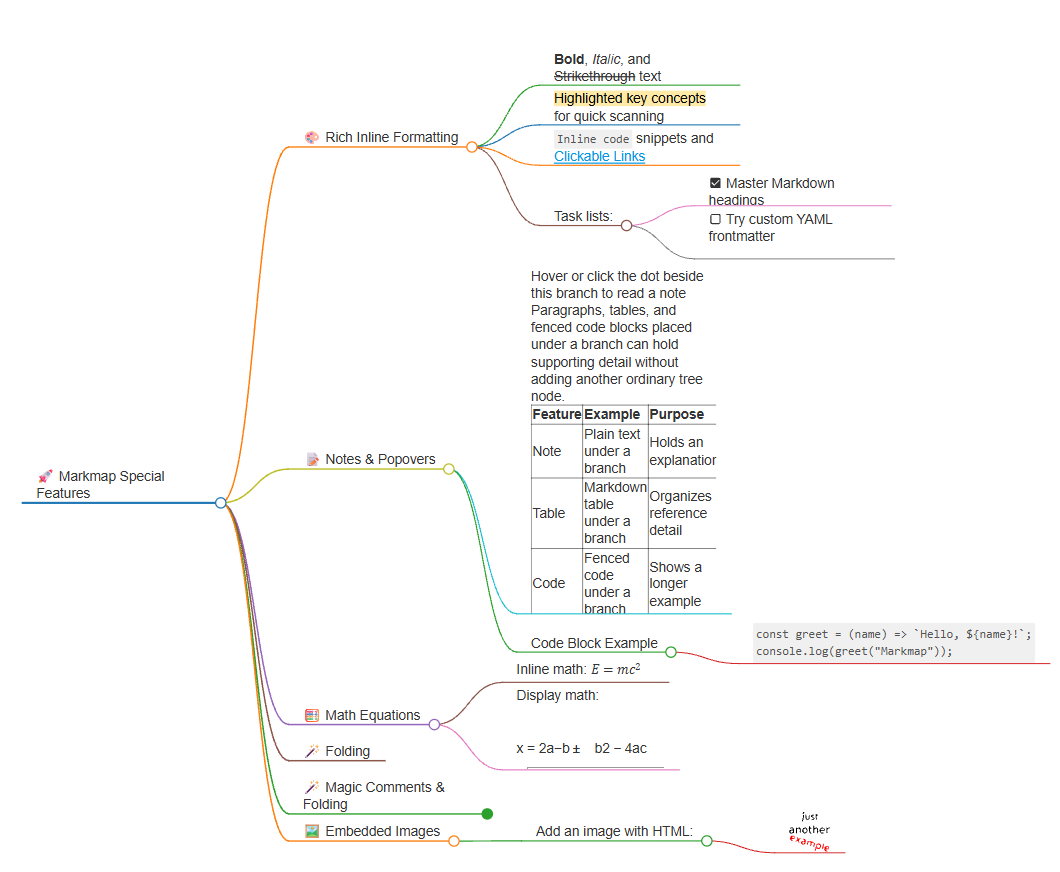
Frontmatter and layout. The YAML block at the top contains presentation settings. theme, layout, colorScheme, colorFreezeLevel, and initialExpandLevel are shown as configuration ideas from the example. Whether each option is recognized—and the exact behavior it produces—depends on the renderer and version. If a setting has no effect, check the renderer’s supported options.
Tree structure. The title is the root. Each ## heading is a top-level branch, and the bullets beneath it are children. Indentation determines parent-child relationships, so consistent indentation is important.
Inline formatting. Bold, italic, strikethrough, inline code, links, and highlight-style text demonstrate how labels can be styled. The rendering of less-common syntax, such as ==highlight==, may depend on the renderer.
Notes and code. The paragraph and table under “Notes & Popovers” are supporting material. The code example shows how a longer snippet can be associated with a branch. Check the rendered result to see whether the material appears as a note, an inline element, or another presentation supported by the tool.
Math. The example includes inline and display-style equations. Math support must be enabled in the renderer; otherwise the dollar-sign notation may display as ordinary text.
Folding. The HTML comment <!-- markmap: fold --> is intended to make the associated branch start folded. The comment does not remove its children from the Markdown. Test that the renderer recognizes the directive.
Images. The HTML <img> tag includes a direct image URL, dimensions, and alternative text. A direct image asset is generally more dependable than a website’s home-page URL. Image and raw HTML support may vary across rendering environments.
Standalone examples
Each example below is a complete Markdown document. You can test them separately without needing the large case study above.
1. Basic hierarchy
This example demonstrates the core mapping from headings and nested bullets to branches.
Render Markmap using VPasCode Tool:
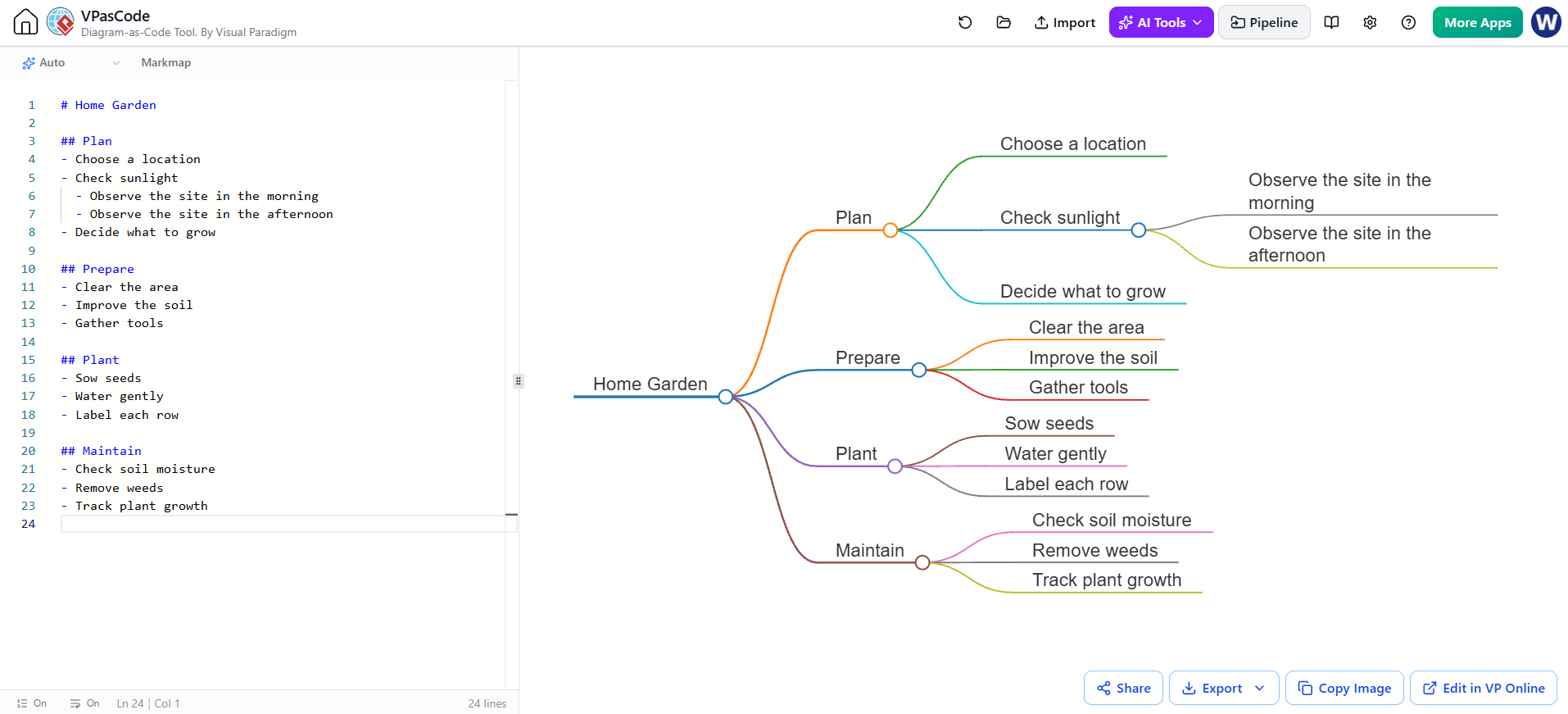
# Home Garden

## Plan
- Choose a location
- Check sunlight
  - Observe the site in the morning
  - Observe the site in the afternoon
- Decide what to grow

## Prepare
- Clear the area
- Improve the soil
- Gather tools

## Plant
- Sow seeds
- Water gently
- Label each row

## Maintain
- Check soil moisture
- Remove weeds
- Track plant growth
2. Inline formatting, links, and task lists
This complete document combines emphasis, code, a link, and checkbox syntax. Whether checkboxes are clickable in the rendered map depends on the tool; the Markdown itself records them as checked or unchecked.
Render Markmap using VPasCode Tool:
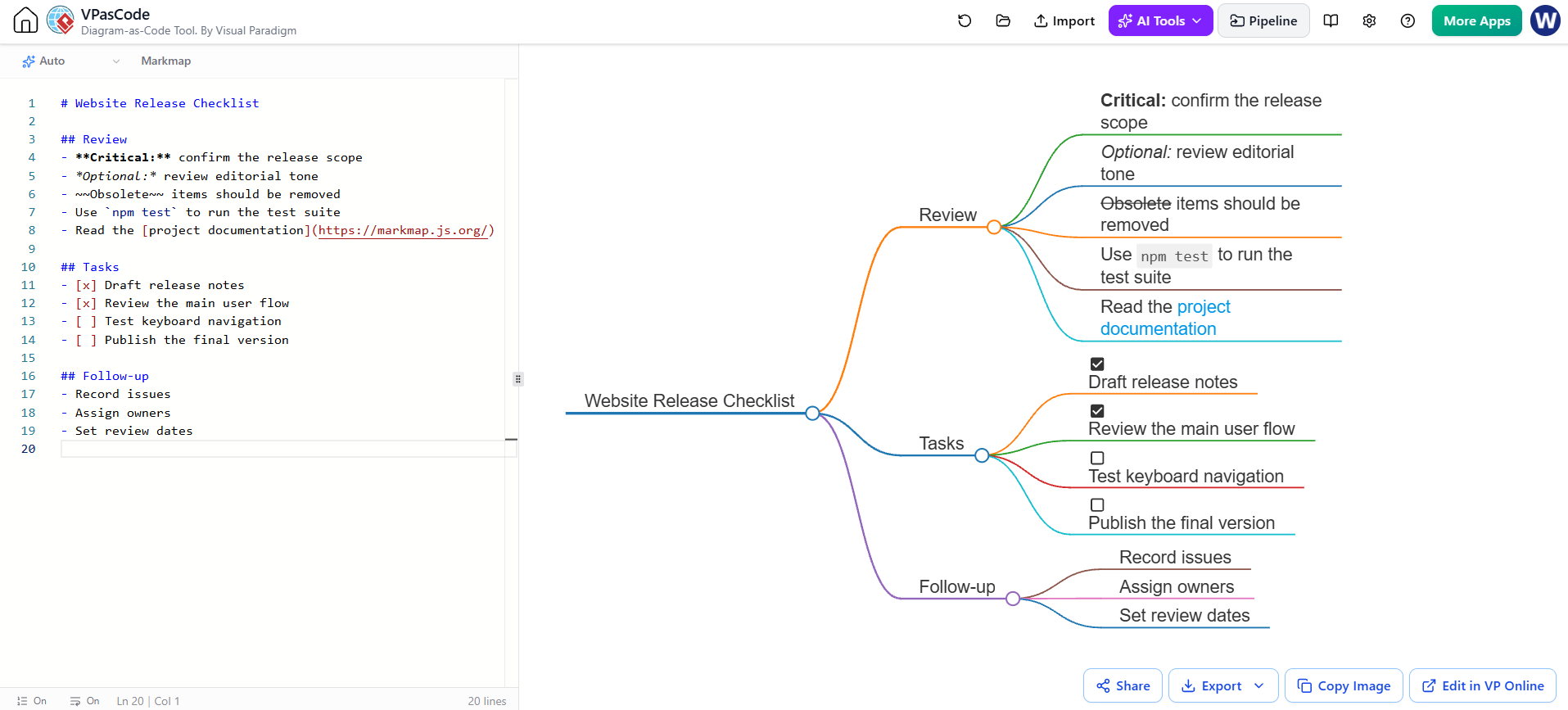
# Website Release Checklist

## Review
- **Critical:** confirm the release scope
- *Optional:* review editorial tone
- ~~Obsolete~~ items should be removed
- Use `npm test` to run the test suite
- Read the [project documentation](https://markmap.js.org/)

## Tasks
- [x] Draft release notes
- [x] Review the main user flow
- [ ] Test keyboard navigation
- [ ] Publish the final version

## Follow-up
- Record issues
- Assign owners
- Set review dates
3. Notes, paragraphs, and tables
This example keeps the visible tree short while associating a paragraph and a reference table with a branch. Inspect the rendering to confirm how the target tool displays attached content.
Render Markmap using VPasCode Tool:
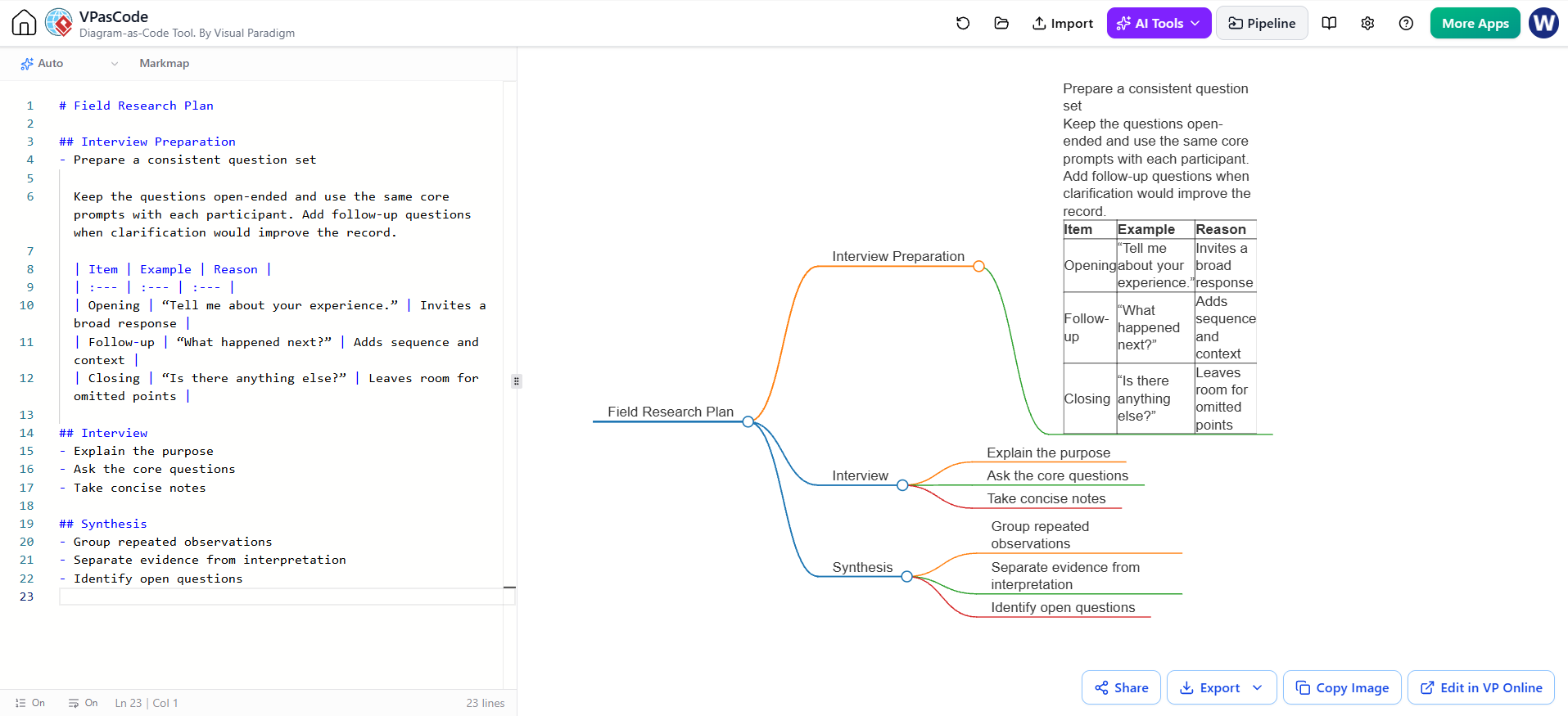
# Field Research Plan

## Interview Preparation
- Prepare a consistent question set

  Keep the questions open-ended and use the same core prompts with each participant. Add follow-up questions when clarification would improve the record.

  | Item | Example | Reason |
  | :--- | :--- | :--- |
  | Opening | “Tell me about your experience.” | Invites a broad response |
  | Follow-up | “What happened next?” | Adds sequence and context |
  | Closing | “Is there anything else?” | Leaves room for omitted points |

## Interview
- Explain the purpose
- Ask the core questions
- Take concise notes

## Synthesis
- Group repeated observations
- Separate evidence from interpretation
- Identify open questions
4. Code block attached to a branch
This example includes a complete JavaScript snippet under a topic. The code is presented as supporting content, not as a set of separate conceptual branches.
Render Markmap using VPasCode Tool:
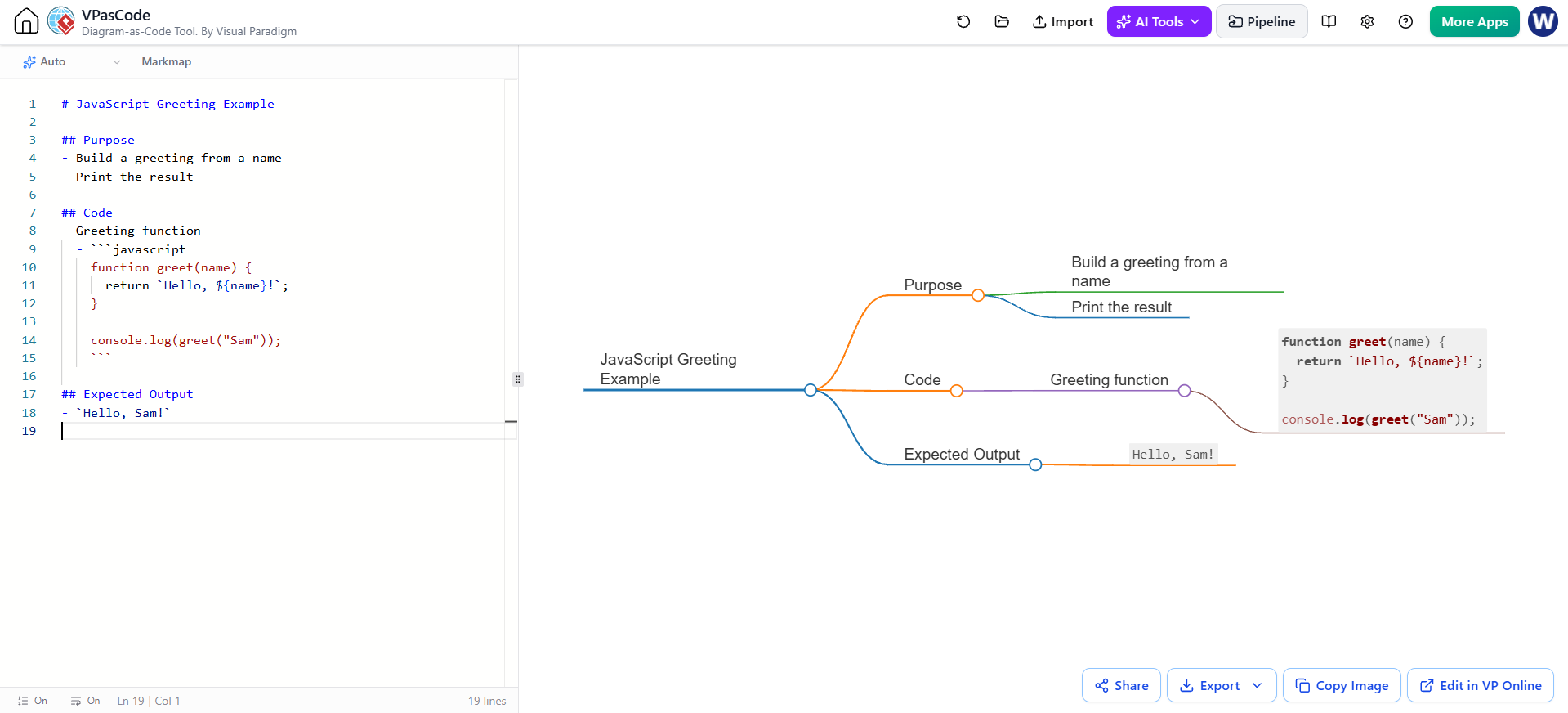
# JavaScript Greeting Example

## Purpose
- Build a greeting from a name
- Print the result

## Code
- Greeting function
  - ```javascript
    function greet(name) {
      return `Hello, ${name}!`;
    }

    console.log(greet("Sam"));
    ```

## Expected Output
- `Hello, Sam!`
5. Inline and display math
This example shows a short expression in a node and a longer equation on its own line. It requires a renderer with math support.
Render Markmap using VPasCode Tool:
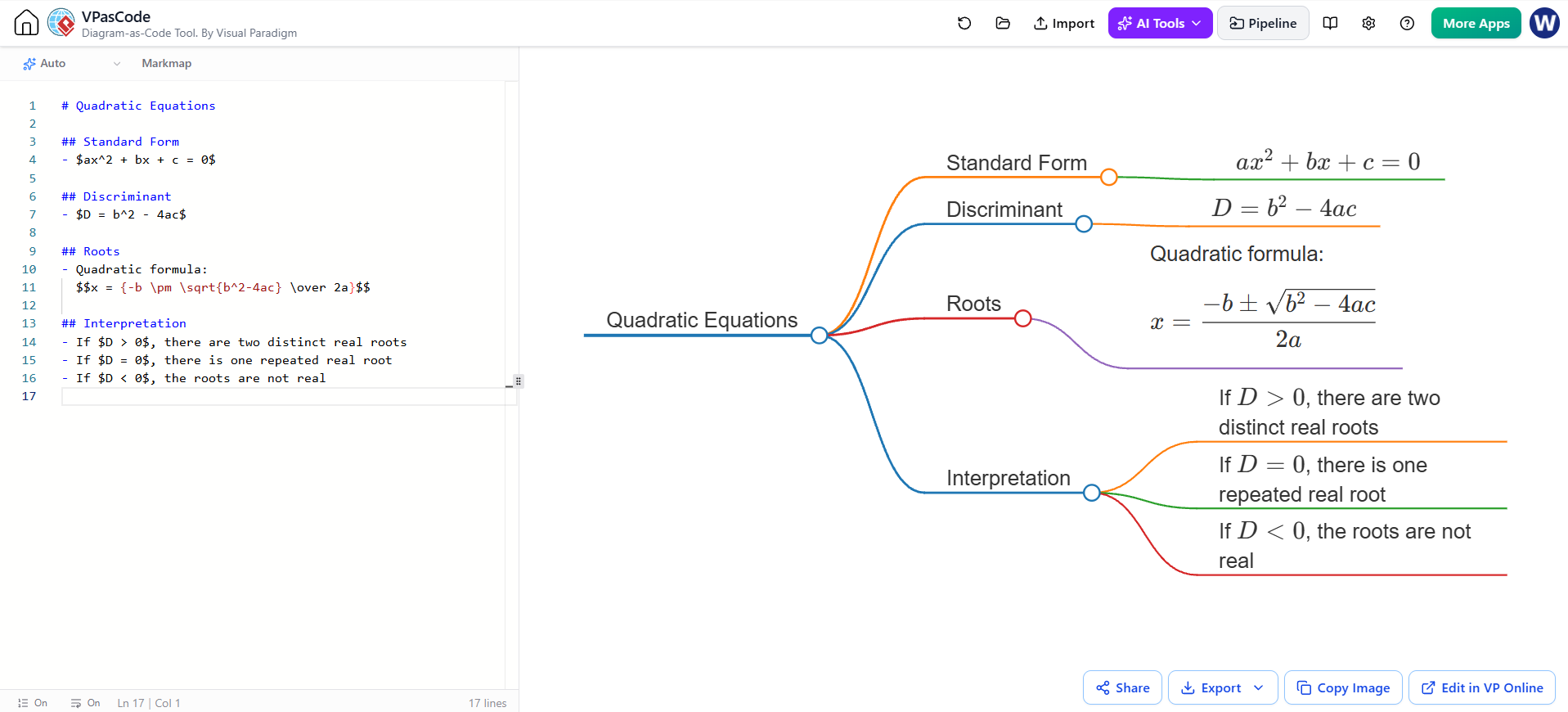
# Quadratic Equations

## Standard Form
- $ax^2 + bx + c = 0$

## Discriminant
- $D = b^2 - 4ac$

## Roots
- Quadratic formula:
  $$x = {-b \pm \sqrt{b^2-4ac} \over 2a}$$

## Interpretation
- If $D > 0$, there are two distinct real roots
- If $D = 0$, there is one repeated real root
- If $D < 0$, the roots are not real
6. Folding a branch
This complete example places the fold comment on the branch heading. If folding is supported, the detailed content under that branch should be hidden initially and available through the map’s expand control.
Render Markmap using VPasCode Tool:
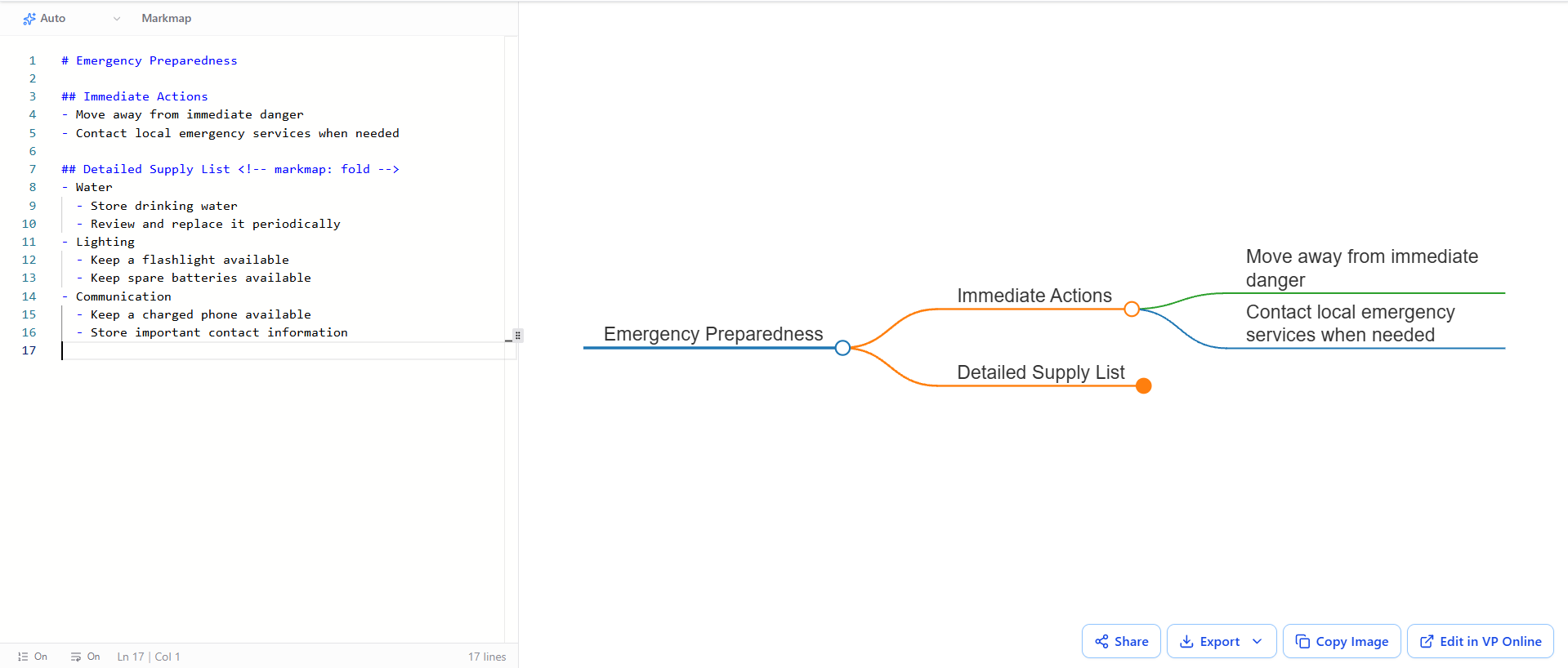
# Emergency Preparedness

## Immediate Actions
- Move away from immediate danger
- Contact local emergency services when needed

## Detailed Supply List <!-- markmap: fold -->
- Water
  - Store drinking water
  - Review and replace it periodically
- Lighting
  - Keep a flashlight available
  - Keep spare batteries available
- Communication
  - Keep a charged phone available
  - Store important contact information
7. Embedding an image
This document shows a small image attached to a branch. Replace the image URL with a direct link to an image you are allowed to use. If the image does not render, check whether the URL points to an image file and whether the renderer permits HTML images.
Render Markmap using VPasCode Tool:
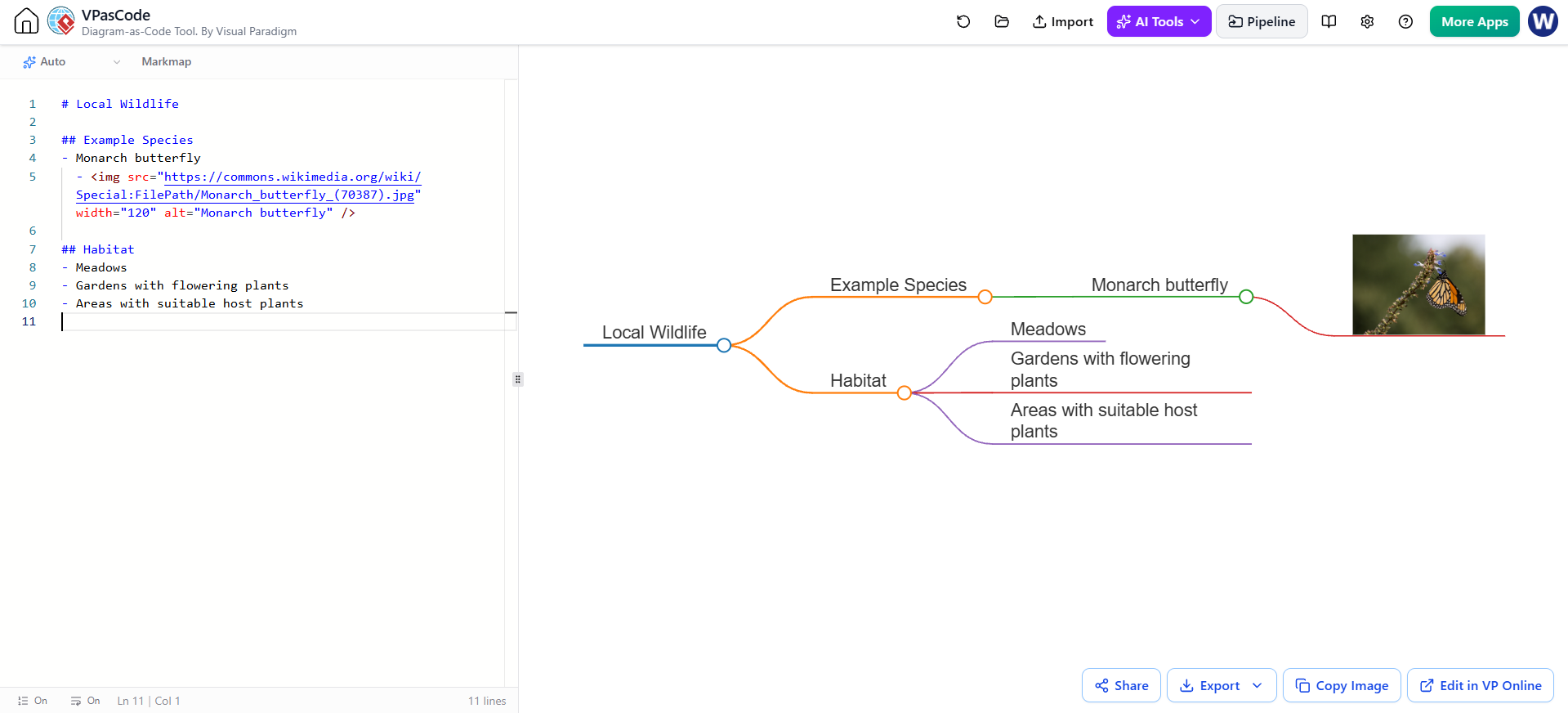
# Local Wildlife

## Example Species
- Monarch butterfly
  - <img src="https://commons.wikimedia.org/wiki/Special:FilePath/Monarch_butterfly_(70387).jpg" width="120" alt="Monarch butterfly" />

## Habitat
- Meadows
- Gardens with flowering plants
- Areas with suitable host plantsPractical design guidance
Keep the visible nodes short. A map is easiest to scan when nodes use compact labels. Put lengthy explanations, tables, and code in supporting content or deeper branches.
Use hierarchy consistently. Main branches should represent categories at roughly the same level. Put examples, steps, and subtopics beneath the category they explain.
Use formatting with purpose. Bold can call attention to a key term; inline code can distinguish commands or identifiers. If every label is emphasized, emphasis stops helping.
Test special features individually. When a map does not display math, images, highlighting, checkboxes, frontmatter, or folding as expected, create a small test document for that feature. This makes it easier to distinguish a Markdown issue from a renderer limitation.
Review the map as well as the source. The Markdown may look neatly organized while the rendered map is crowded. Check branch balance, label length, note behavior, and expand/collapse controls in the final tool.
Tooling: Creating and Refining a Markmap with Visual Paradigm VPasCode and AI
Visual Paradigm’s VPasCode combines a text editor with a live diagram preview, so you can edit Markmap’s Markdown source and inspect the rendered map as you work. Its AI tools can help draft or modify diagram code; the AI Diagramming Chatbot can also generate MarkMap syntax that you can then import into VPasCode for hands-on editing.
Workflow
- Generate an outline with AI. Ask for a Markmap-ready Markdown outline, and specify the audience, main branches, and level of detail. For example:
Create a Markmap-ready Markdown outline explaining advanced Markmap features to a beginner. Include branches for hierarchy, formatting, notes, code, math, folding, images, frontmatter, and troubleshooting. Use concise labels and include a small example under each branch. Return Markdown only.
- Review the generated source. Check that the output begins with a single
#root heading, that the##headings represent the main branches, and that indentation places each bullet under the correct parent. Remove repeated or unsupported claims before rendering. - Open the Markmap in VPasCode. Paste the Markdown into the editor, or generate it through the AI Diagramming Chatbot and send the result to Pipeline, then import it into VPasCode. The chatbot-to-Pipeline route is useful when you want to start conversationally; editing the Markdown in VPasCode gives you precise control over its wording and hierarchy. visual-paradigm.com
- Refine and preview. Edit the source and inspect the live map. Try expanding and collapsing branches, zooming and panning, and checking whether notes, code, math, links, and images display as intended. VPasCode describes real-time rendering and an interactive canvas for Markmap. visual-paradigm.com
- Test frontmatter separately. Add the YAML block at the very beginning of the document, outside any fenced code block. Change one setting at a time and compare the preview. If the map looks unchanged, the renderer may not support that option, the setting may match the default, or the outline may not be deep enough for an expansion setting to show a difference.
- Use AI for targeted revisions. Rather than asking AI to regenerate the whole map, request a specific change, such as “Move the image example under Embedded Media,” “Shorten the labels in the Notes branch,” or “Add one nested example under Math.” Review each change in the Markdown and preview.
- Save or reuse the result. Once the structure and rendering look right, use the save, export, or sharing options available in your VPasCode workspace. Visual Paradigm also describes sending MarkMaps to Pipeline and inserting them into OpenDocs pages for documentation. visual-paradigm.com
Best practice: Treat AI as a drafting and editing assistant, not as the final reviewer. Verify facts, test renderer-dependent features in VPasCode, and keep the Markdown source as the editable version of the map.
Conclusion
The full case study combines a conventional Markdown outline with advanced content and presentation features. Headings and indentation create the tree; inline styling, links, and task lists enrich labels; notes and code blocks hold supporting detail; math and images add technical or visual content; and folding helps manage dense branches. The standalone examples let you test each feature in isolation. Once they work in your chosen renderer, combine the techniques that best serve the readers and purpose of your map.