

In the realm of modern software engineering and systems architecture, context is everything. Teams often find themselves trapped in “tool fragmentation,” where analysts use one diagramming tool, architects use another, and developers rely on a third. This disconnect creates friction, version control nightmares, and inconsistent documentation.
Visual Paradigm Desktop solves this by acting as a centralized, broad toolset. This tutorial explores the architectural philosophy behind this platform, specifically focusing on how it unifies modeling, documentation, and implementation workflows into a single, cohesive environment.
1. The Unified Modeling Environment
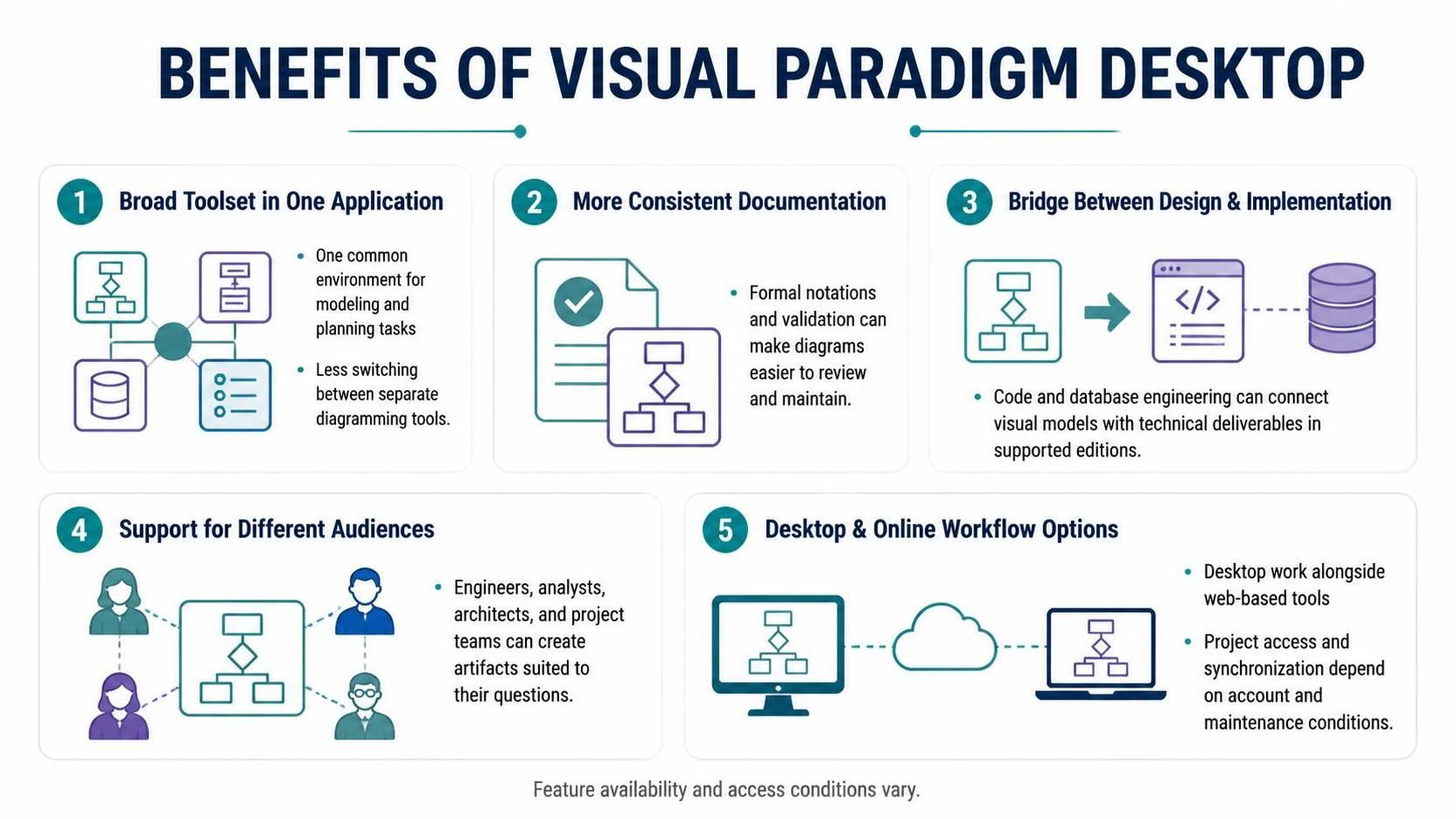
The primary benefit of Visual Paradigm Desktop is the consolidation of the “Broad Toolset.” Instead of maintaining a library of disparate applications for Data Flow Diagrams (DFD), Unified Modeling Language (UML), and Business Process Model and Notation (BPMN), the platform offers a common environment for all modeling and planning tasks.
This approach minimizes the cognitive load on your team. When a software engineer needs to switch from a Class Diagram to a Sequence Diagram, they do not need to launch a new executable or relearn a new interface. The modeling context remains consistent, allowing for seamless transitions between planning and technical specification.
Key Modeling Capabilities
- Unified Interface: One environment for various modeling tasks.
- Reduced Friction: Eliminate the time lost switching between separate diagramming tools.
- Centralized Data: Models are stored in a structured repository, preventing version drift.
2. Formal Notations and Consistent Documentation
Documentation is often the weakest link in software projects because it is difficult to maintain. Visual Paradigm addresses this through strict adherence to formal notations and validation rules. By enforcing these standards, the tool ensures that diagrams are not just “drawings” but are mathematically and logically valid representations of the system.
This consistency makes diagrams significantly easier to review and maintain. When a team adopts a formal notation, it reduces ambiguity. A rectangle in a Class Diagram means exactly one thing, regardless of who drew it. This standardization is crucial for large-scale projects where multiple stakeholders must review the architecture.
3. The Bridge Between Design and Implementation
Perhaps the most powerful architectural feature of Visual Paradigm Desktop is its ability to serve as a bridge between design and implementation. In many traditional workflows, the “design” phase ends with a set of diagrams, and the “implementation” phase begins with a blank code editor.
Visual Paradigm connects visual models with technical deliverables. It supports code engineering and database engineering features that allow for bidirectional synchronization. This means you can generate code from a UML Class Diagram or reverse-engineer existing code back into a diagram to visualize legacy systems.
' Example of how a Class Diagram links to Code Implementation
@startuml
class User {
  -id: int
  -name: String
  +login()
}

class Database {
  -connectionString: String
  +saveUser(u: User)
}

User --> Database : persists
@enduml
4. Supporting Diverse Audiences
A single tool cannot serve every role in a project team. Visual Paradigm Desktop excels here by supporting different audiences simultaneously. It allows stakeholders to create artifacts that are specifically suited to their questions.
- Software Engineers: Focus on detailed class structures and sequence logic.
- Analysts: Focus on high-level use cases and business processes.
- Architects: Focus on system topology and component interaction.
- Project Teams: Focus on project timelines and resource allocation.
5. Desktop and Online Workflow Options
Modern development requires flexibility. Visual Paradigm Desktop supports a hybrid workflow that combines the power of a local desktop application with the accessibility of web-based tools. This architecture ensures that while heavy processing and complex modeling happen on the desktop, project access and synchronization are available via the cloud.
This setup allows for a distributed team to work on the same project. However, it is important to note that project access and synchronization depend on specific account and maintenance conditions. Teams should verify their licensing tiers to ensure they have the necessary permissions for cloud collaboration.
Strategic Implementation
Because Visual Paradigm is a broad platform, its range can be overwhelming. The recommended strategy for adoption is to start with the diagram types that match your immediate work rather than trying to use every feature at once. Do not assume every feature is included in every edition; always compare the current edition matrix against your required workflows before standardizing on the tool.
Final Thoughts
To truly validate the platform for your team, the best approach is a practical evaluation. Model one real, modest-sized task—such as a key workflow or a small software feature—and check whether the editor, notation support, collaboration approach, and exports fit your team’s process. By grounding the evaluation in a real-world scenario, you can accurately assess whether Visual Paradigm Desktop will serve as the architectural backbone for your organization.