

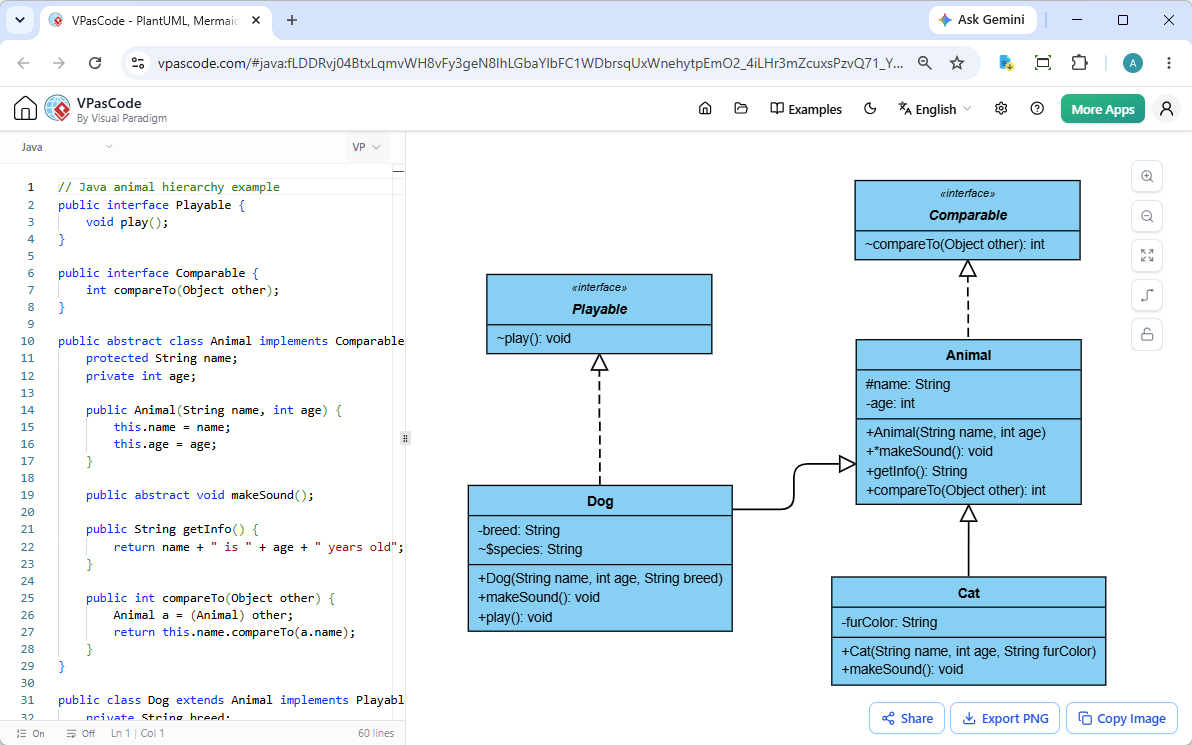
In the world of software engineering, bridging the gap between raw source code and high-level system architecture is a critical skill. VPasCode (Visual Paradigm as Code) revolutionizes this process by allowing developers to define complex system structures using simple text scripts, which are then rendered into professional UML diagrams in real-time.
This tutorial explores the system architecture and modeling concepts demonstrated in the provided diagram, specifically focusing on Java Object-Oriented design patterns: Interfaces, Abstract Classes, Implementation, and Inheritance.
Understanding the System Architecture
The diagram illustrates a robust object-oriented design for an “Animal” hierarchy. It effectively demonstrates how to model polymorphism and behavior contracts in Java. The architecture is built upon four key components:
- Behavioral Contracts (Interfaces): The
PlayableandComparableinterfaces define what objects can do, regardless of what they are. - Abstract Base Class: The
Animalclass acts as a template, providing common state (attributes) and partial behavior for all animals. - Concrete Implementations: The
DogandCatclasses represent specific entities that fill in the blanks left by the abstract parent.
Key Modeling Concepts
1. Interfaces and Implementation
In the diagram, you can see Playable and Comparable are depicted with the stereotype <<interface>>. This denotes that they are purely abstract types.
Notice the relationship between the Animal class and Comparable: a dashed line with a hollow triangle points from Animal to Comparable. This represents Realization (or Implementation) in UML. It signifies that the Animal class promises to provide the logic for the compareTo method defined in the interface.
2. Abstract Classes and Inheritance
The Animal class is defined as abstract. This is a crucial architectural decision. It allows the class to hold shared data (like name and age) and common methods (like getInfo()), while leaving specific behaviors (like makeSound()) undefined.
The solid line with a hollow triangle pointing from Dog and Cat to Animal represents Generalization (Inheritance). This means that both Dog and Cat are types of Animals and inherit all public and protected members of the parent class.
3. Visibility and Syntax
VPasCode automatically translates Java syntax into UML visibility symbols:
- Public (+): Methods like
+play()are accessible from anywhere. - Protected (~): Attributes like
~nameare accessible within the class and its subclasses. - Private (-): Attributes like
-ageare encapsulated and hidden from external access.
Defining the Diagram in VPasCode
To recreate this architecture, you do not need to drag and drop boxes. Instead, you write code. Below is the Java source code used to generate the diagram shown in the context, demonstrating how the text-to-diagram engine parses the structure.
// Java animal hierarchy example
public interface Playable {
    void play();
}

public interface Comparable {
    int compareTo(Object other);
}

public abstract class Animal implements Comparable {
    protected String name;
    private int age;

    public Animal(String name, int age) {
        this.name = name;
        this.age = age;
    }

    public abstract void makeSound();

    public String getInfo() {
        return name + " is " + age + " years old";
    }

    public int compareTo(Object other) {
        Animal a = (Animal) other;
        return this.name.compareTo(a.name);
    }
}

public class Dog extends Animal implements Playable {
    private String breed;

    public Dog(String name, int age, String breed) {
        super(name, age);
        this.breed = breed;
    }

    public void makeSound() {
        System.out.println("Woof!");
    }

    public void play() {
        System.out.println("Fetching ball...");
    }
}

public class Cat extends Animal {
    private String furColor;

    public Cat(String name, int age, String furColor) {
        super(name, age);
        this.furColor = furColor;
    }

    public void makeSound() {
        System.out.println("Meow!");
    }
}The Workflow: From Code to Canvas
The power of VPasCode lies in its live rendering workflow. As you type the code on the left (as seen in the screenshot), the diagram on the right updates instantly. This allows for rapid prototyping and refactoring.
For instance, if you decide to change Dog to extend Playable but not Animal, you can simply modify the extends keyword in the code, and the diagram will immediately restructure itself, removing the inheritance line and preserving the implementation line.
Best Practices for Diagram-as-Code
- Keep it Clean: Since the diagram is generated from code, ensure your code is well-indented and commented. VPasCode uses these comments to generate helpful tooltips or notes.
- Version Control: Unlike traditional diagram files (.vmx) which are binary and hard to merge, text-based code scripts are perfect for Git. You can track who changed a method signature or added a new class.
- Export Flexibility: Once the diagram is finalized, you can export it as SVG for scalable vector graphics in documentation or PNG for quick screenshots in tickets.
By leveraging VPasCode, teams can maintain a single source of truth: the code itself. This eliminates the common problem of “outdated diagrams” where the visual model no longer matches the actual software implementation.